DevOps, Cloud, and Delivery: How Software Actually Gets to Users

Here is a question that sounds simple but trips up most people new to software: once an engineer finishes writing code, how does it actually reach the millions of people using the product?
It does not just "go live." Between a developer typing the last line of code and a user seeing a new feature, there is an entire assembly line. That assembly line is what this article is about. It is the part of engineering called delivery: building software, testing it, packaging it, shipping it to servers, and running it reliably once it is out there.
For a TPM, this is some of the most useful knowledge you can have. Most of the schedule risk in a program does not live in writing the code. It lives in getting the code out safely. When a launch slips, it is usually because the delivery pipeline is slow, manual, or scary to use. When an incident happens, it is usually during or right after a deploy. If you understand how delivery works, you understand where your real risks are.
Let us walk the whole path, from a code change to a happy user, one piece at a time.
The pipeline: from a code change to production
Imagine a developer fixes a bug. They save their change and "push" it to the shared codebase. What happens next, in a healthy team, is automatic.
A system called a CI/CD pipeline wakes up and runs a series of steps. CI stands for Continuous Integration, CD for Continuous Delivery (or Deployment). Do not worry about memorizing the words. Think of it as an assembly line that every code change has to pass through before it is allowed near real users.
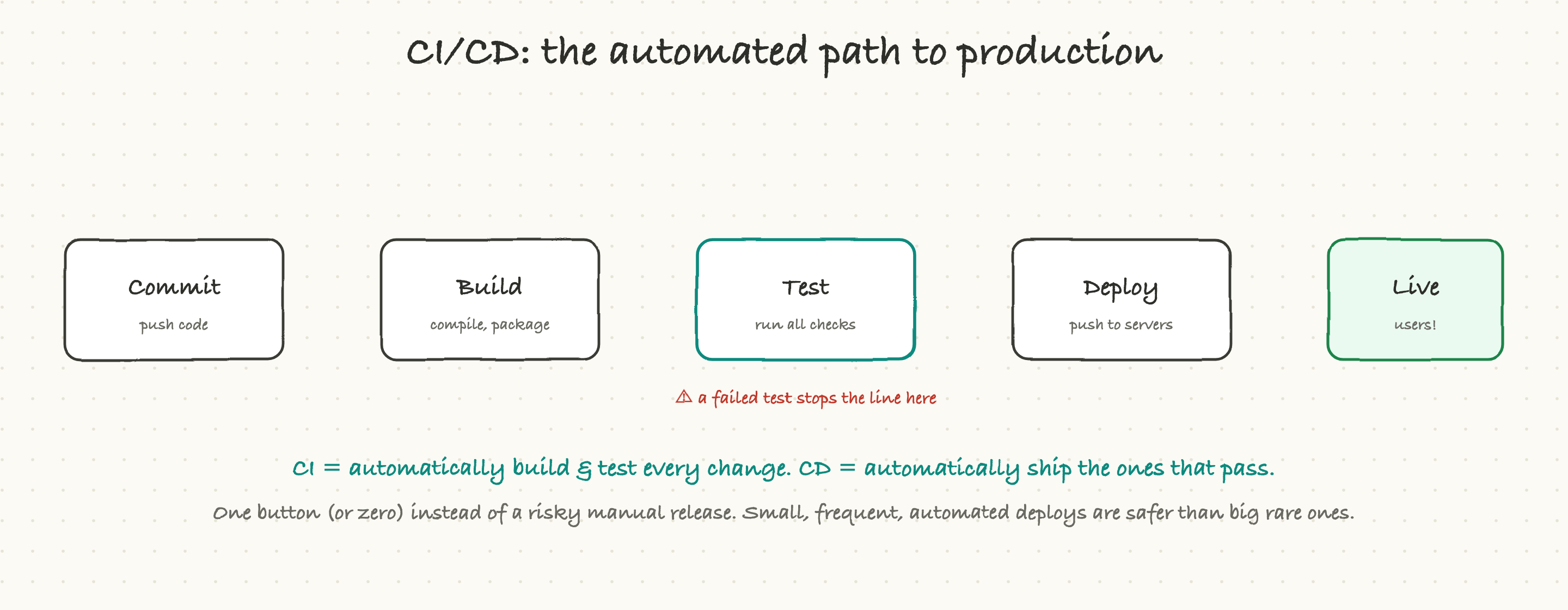
The steps usually look like this:
- Build. Take the raw code and turn it into something runnable. If the code does not even compile or assemble correctly, the line stops right here.
- Test. Run hundreds or thousands of automated checks. Does the new code do what it should? Did it accidentally break something that used to work? These tests run in seconds or minutes, with no human involved.
- Package. Bundle the working software into a neat, sealed box (we will get to containers shortly) so it runs the same everywhere.
- Deploy. Ship that box out to the servers that real users hit.
The magic word here is automatic. A good pipeline runs all of this without a person clicking through steps. The whole point is that shipping a change becomes boring and routine instead of a tense, all-hands event.
Here is what makes this powerful: if any step fails, the line stops and nothing ships. A failing test is not a disaster; it is the system doing its job. It caught the problem before a user ever saw it.
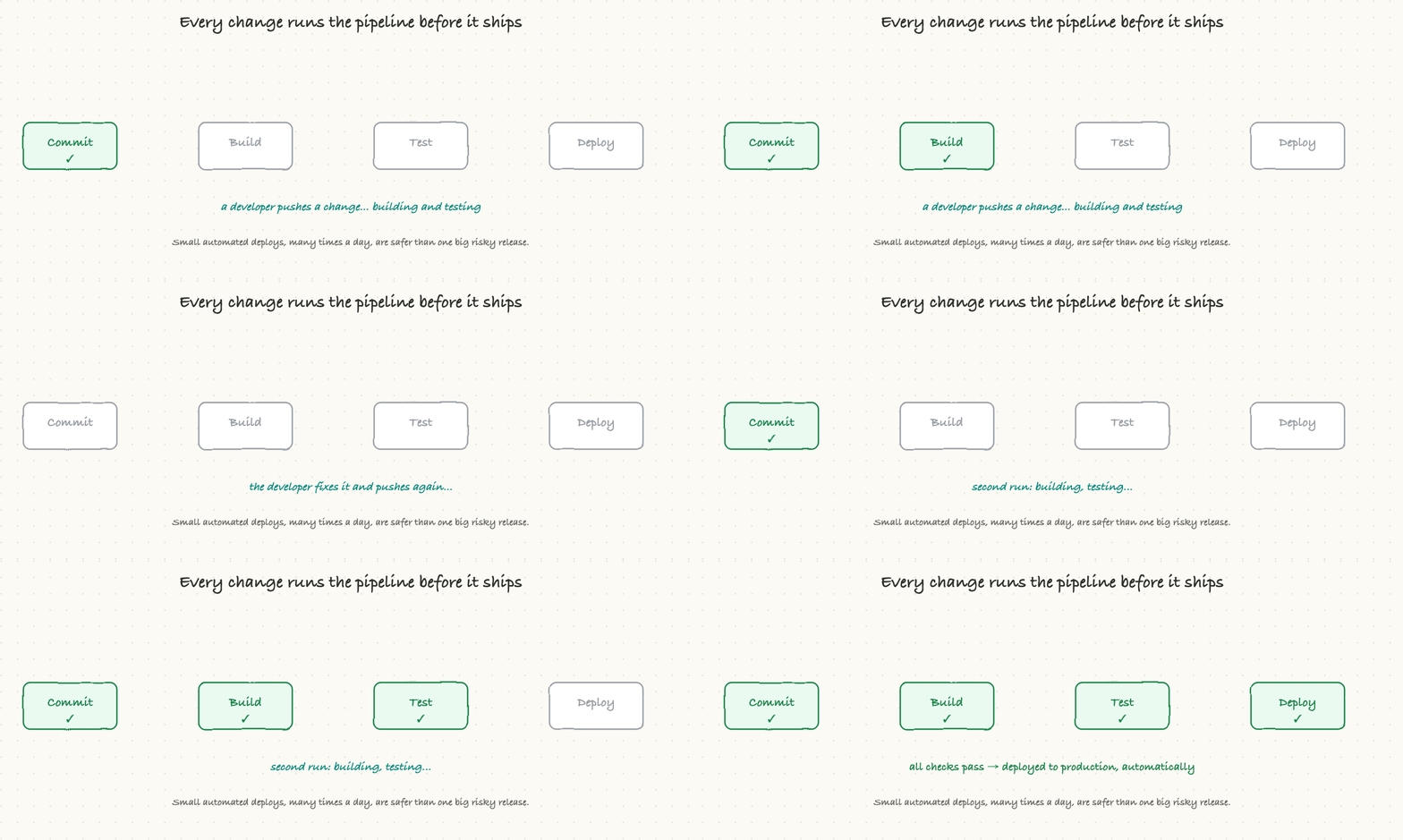
Notice the loop in that animation. The first run failed a test, so nothing went out. The developer fixed it, pushed again, and the second run went green all the way to production. No one had to remember a checklist. The pipeline remembered it for them.
Why this matters to a TPM: ask your team one question early, "How long does it take, and how many manual steps, to get one change from merged to live?" If the answer is "a few minutes, fully automated," your delivery risk is low. If the answer is "a couple of days and a release manager runs a 30-step doc," that is your real schedule risk, and it is worth investing to fix. Teams that deploy in minutes can also recover in minutes. Teams that deploy in days are slow to fix their own mistakes too.
Deploying without breaking things: rollout strategies
Getting code onto servers is one thing. Getting it there without taking the product down is the real skill. The naive way, replace everything everywhere all at once, is exactly how you turn one bad line of code into a full outage.
So teams use smarter rollout strategies. There are four common ones, and they are easy to picture.
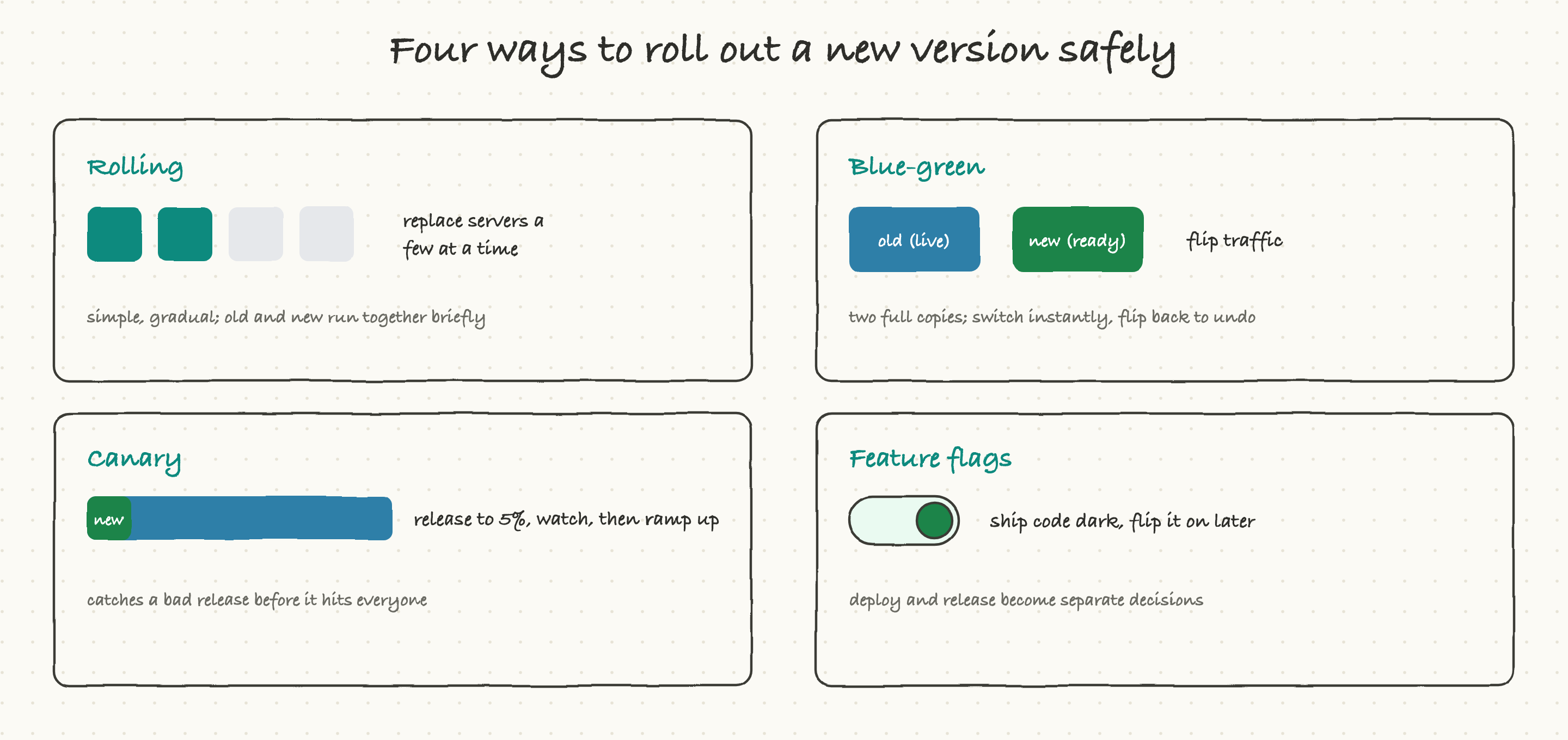
Rolling. Replace your servers a few at a time instead of all at once. While the rollout is in progress, some servers run the old version and some run the new one. It is simple and gradual. The downside: for a little while you have two versions live together, so the new version has to be able to coexist with the old.
Blue-green. Keep two complete copies of your system: the current live one ("blue") and a fully prepared new one ("green"). You flip all the traffic from blue to green in an instant. If something is wrong, you flip straight back. It is fast and the undo button is instant, but you are paying to run two full copies during the switch.
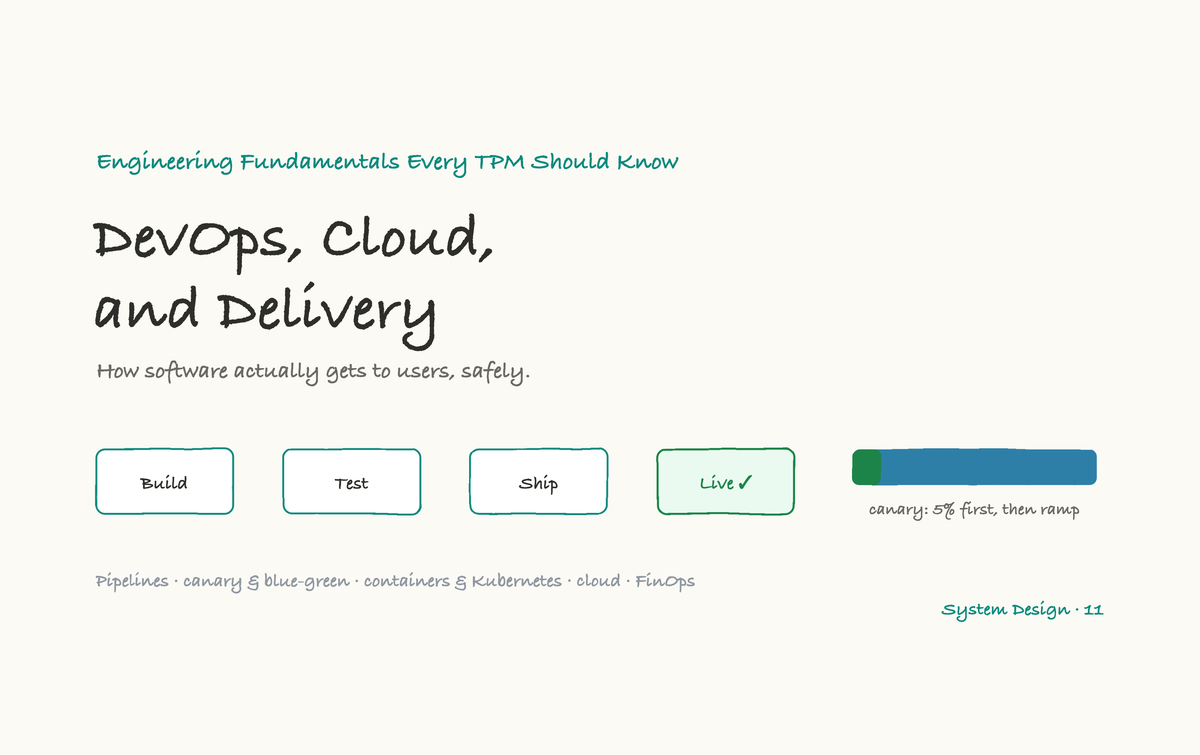
Canary. This is the careful one, and it is worth understanding well. You release the new version to a tiny slice of users first, say 5 percent. You watch that slice closely. Are errors up? Is it slower? If the small group looks healthy, you ramp up to 25, 50, then 100 percent. If it looks bad, you roll back, and only that small group was ever affected. The name comes from the "canary in a coal mine": a small early warning before everyone is in danger.
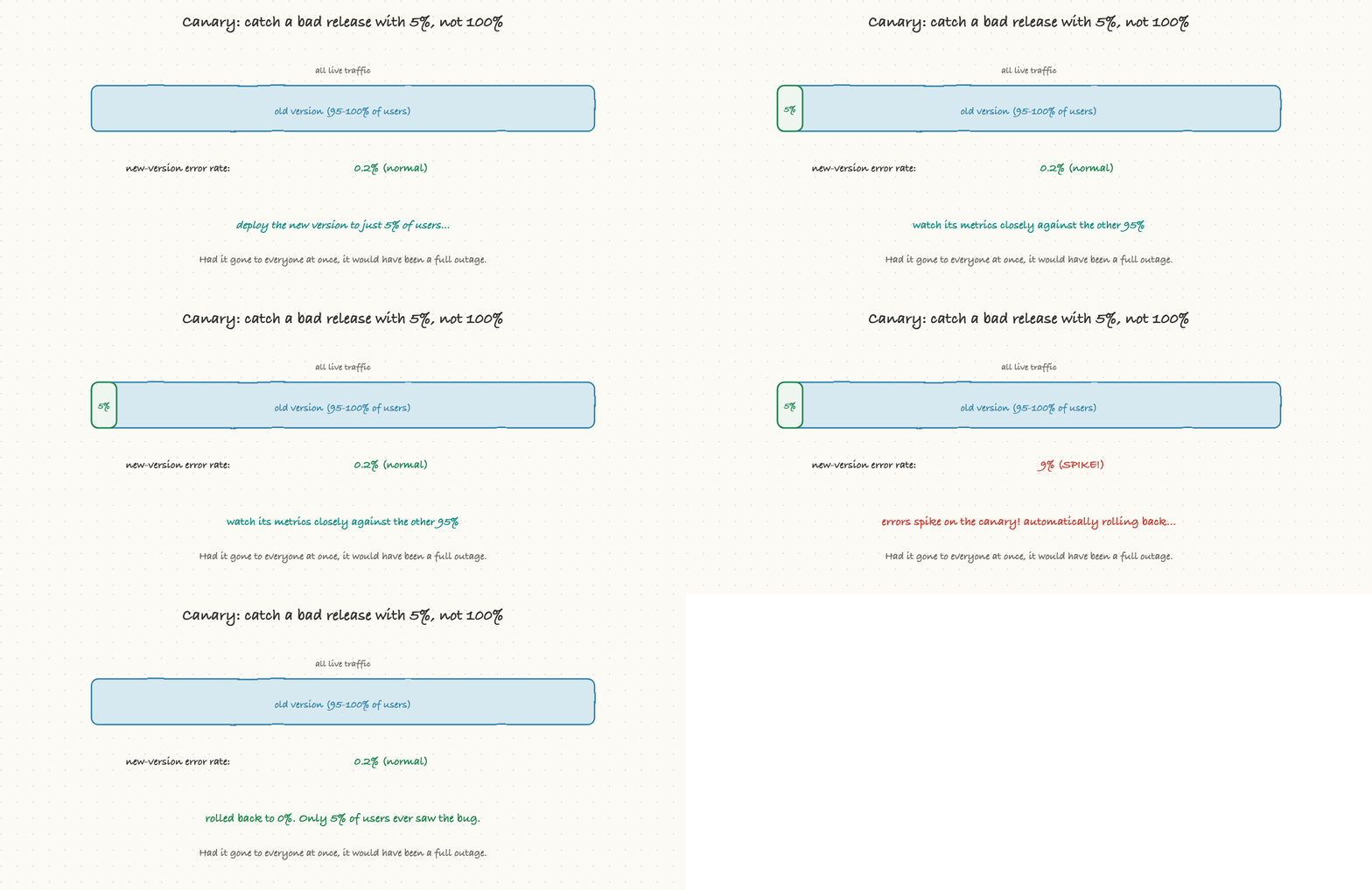
That animation is the whole argument for canary deploys in five seconds. The bad version went to 5 percent of users, its error rate spiked, and the system rolled it back automatically. Ninety-five percent of users never saw the bug. Without canary, that same bad release would have gone to everyone at once, and you would be writing an incident report instead of reading a dashboard.
Feature flags. This one is a little different and incredibly useful. A feature flag is a switch in the code that lets you turn a feature on or off without deploying again. The code ships "dark," already in production but invisible, and you flip it on later, maybe for employees first, then 1 percent of users, then everyone. The key idea: deploying code and releasing a feature become two separate decisions. You can ship all month and choose the launch moment independently, and if a feature misbehaves, you flip it off in seconds instead of doing an emergency deploy.
Why this matters to a TPM: when you are planning a high-stakes launch, the right question is not just "when is the code ready?" It is "how are we rolling this out, and how fast can we undo it?" A team that can canary a change and roll back in two minutes can take risks safely. A team that deploys all-or-nothing with no quick undo will, understandably, be slow and nervous, and that fear shows up as schedule drag. Feature flags in particular are a TPM's best friend for decoupling an engineering deadline from a marketing launch date.
Packaging software so it runs anywhere: containers
There is a problem as old as software: "it works on my machine." Code runs fine on the developer's laptop, then breaks on the test server, then breaks differently in production. The reason is almost always that the environments are subtly different: a different version of some library, a missing setting, a different operating system detail.
Containers solved this. A container is a sealed box that holds your application plus everything it needs to run: the code, the specific libraries it depends on, and its configuration, all packaged together. Because the box carries its whole environment with it, it runs identically on a laptop, a test server, and production. The differences between machines stop mattering.
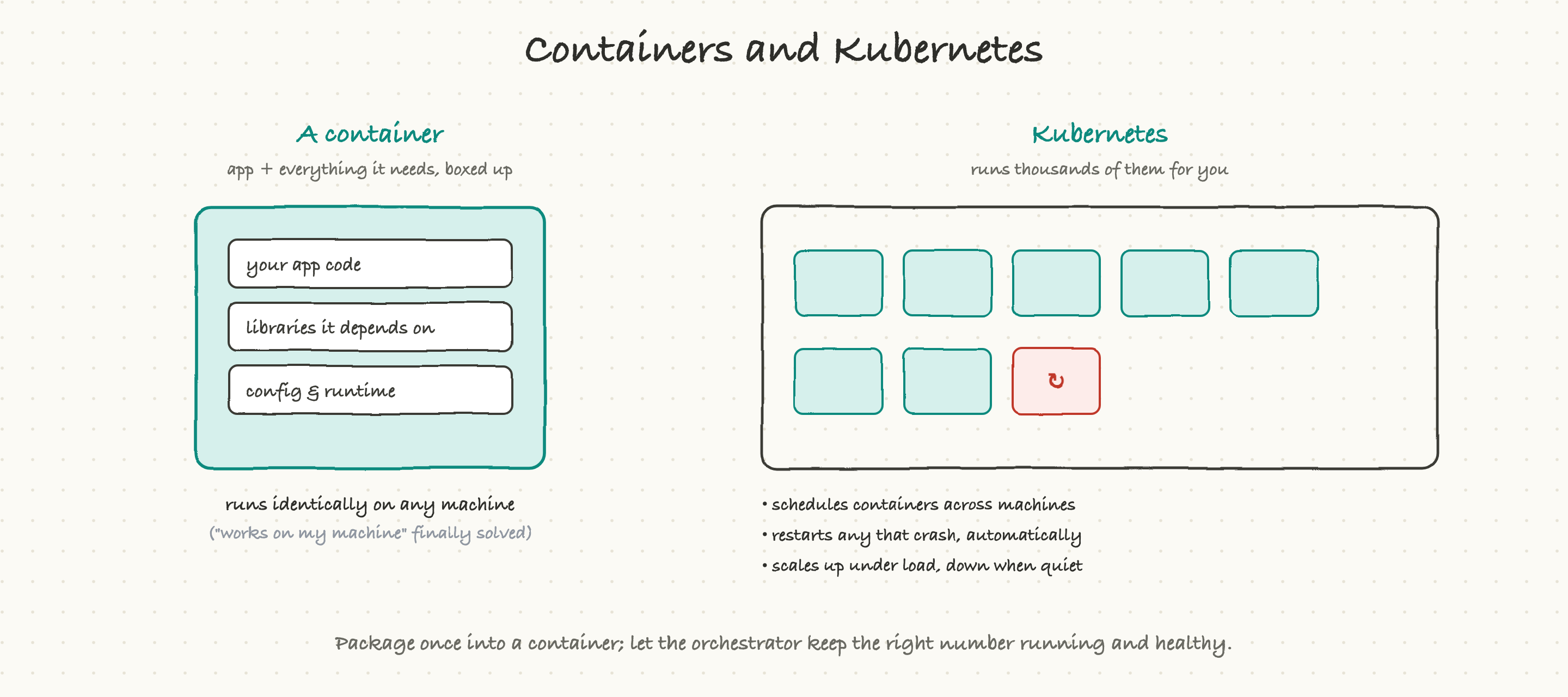
A container is lightweight, it starts in seconds, and you can run many of them on one machine. That is great until you have hundreds or thousands of them. Now you have a new problem: who starts them, who restarts the ones that crash, who adds more when traffic spikes, and who spreads them across machines so one dead server does not take you down?
That job is called orchestration, and the tool almost everyone uses is Kubernetes (often shortened to "K8s"). You do not need to know how it works internally. You need to know what it does for you:
- It schedules containers across a pool of machines so the load is spread out.
- It watches every container and automatically restarts any that crash. Self-healing, no human paged at 3 a.m.
- It scales up by starting more containers when traffic rises, and scales back down when it is quiet, so you are not paying for idle capacity.
The mental model: you package your app once into a container, and you tell the orchestrator "keep ten healthy copies of this running at all times." It handles the rest, including the messy reality that machines and containers die all the time.
Why this matters to a TPM: containers and Kubernetes are why "infrastructure" is no longer a giant manual effort for every team, and why scaling and recovery can be automatic rather than heroic. When a team says they are "containerized" and "running on Kubernetes," that is usually good news for your reliability and your ability to scale on launch day. When they are not, ask what their plan is for the traffic spike you are about to send them.
Where all this runs: the cloud
For most of computing history, if you wanted to run software, you bought physical servers, put them in a room, and maintained them yourself. That is "on-premises," or on-prem. It is expensive, slow to grow, and you are responsible for everything down to the air conditioning.
The cloud changed the model. Instead of buying machines, you rent computing from a provider (the big three are AWS, Google Cloud, and Microsoft Azure) and pay only for what you use, by the second. Need a hundred servers for an hour? Rent them, then give them back. This is why a small startup can now run on the same caliber of infrastructure as a giant company.
But "the cloud" is not one thing. There are levels, depending on how much you run yourself versus how much the provider runs for you.
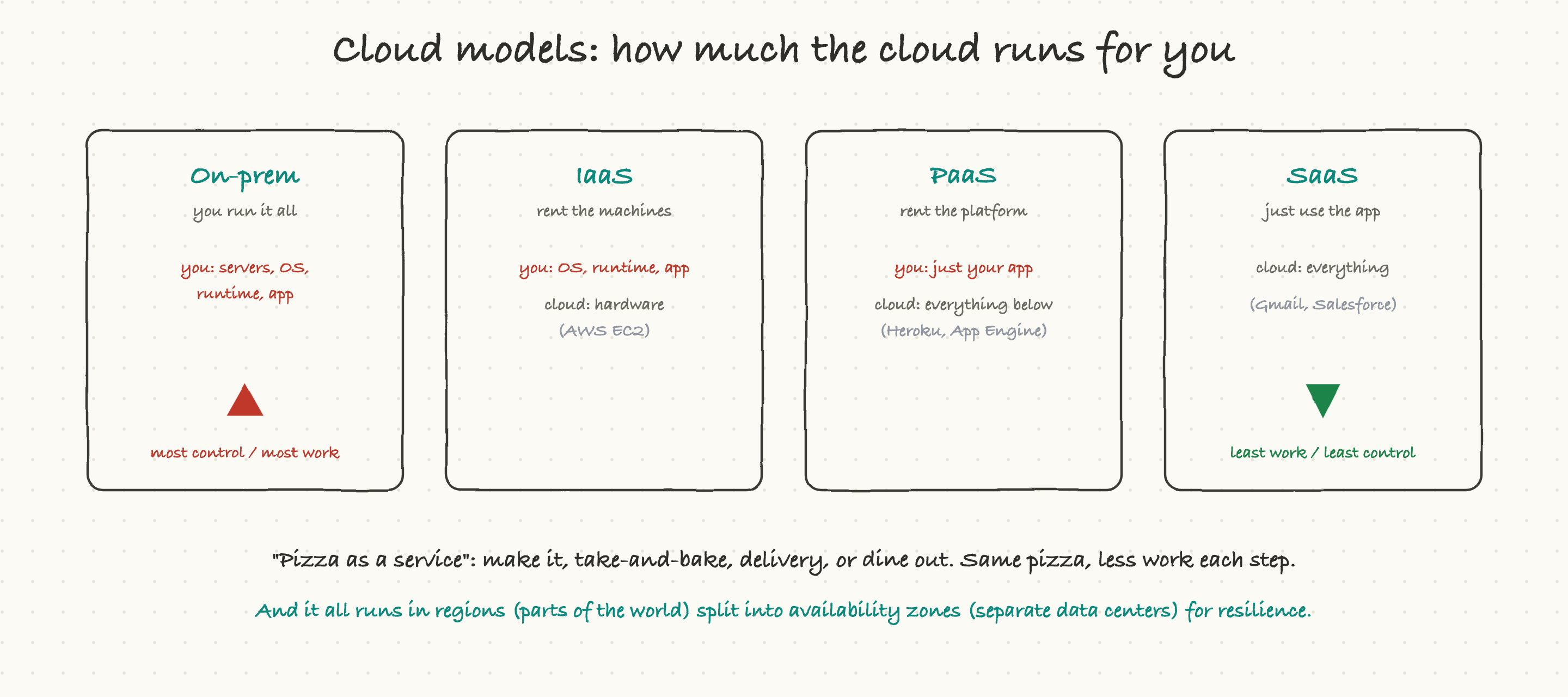
- IaaS (Infrastructure as a Service): you rent the raw machines, and you still manage the operating system, the runtime, and your app on top. Most control, most work. Example: renting bare virtual servers.
- PaaS (Platform as a Service): you hand over your app and the platform runs everything underneath it, the machines, the operating system, the scaling. You just bring your code. Less control, far less work.
- SaaS (Software as a Service): you do not run anything; you just use finished software over the internet. Gmail and Salesforce are SaaS. Someone else runs all of it.
The classic way to remember this is "pizza as a service." On-prem is making the pizza from scratch in your own kitchen. IaaS is take-and-bake: they supply the kitchen, you do the cooking. PaaS is delivery: the pizza arrives ready, you just provide the table. SaaS is dining out: you show up and eat. Same pizza, less work at every step.
One more cloud idea worth knowing, because it comes up constantly in reliability conversations: regions and availability zones. A cloud provider runs data centers all over the world. A region is a geographic area (say, "US East" or "Europe West"). Inside each region are multiple availability zones, which are physically separate data centers with independent power and networking. Teams spread their systems across several zones so that if one data center has a fire or a power cut, the others keep serving and users never notice. When you hear "we are multi-AZ" or "we failed over to another region," this is what it means: deliberate redundancy so a local disaster is not a global outage.
Why this matters to a TPM: cloud choices shape both your cost and your resilience. "Are we spread across multiple availability zones?" is a fair and important question to ask before a big launch, because the answer tells you whether a single data center problem can take your whole product down.
Making infrastructure repeatable: Infrastructure as Code
In the old world, setting up servers meant a person clicking through screens or running commands by hand. The problem with hand-built infrastructure is that it is impossible to reproduce exactly, nobody remembers every click, and the test environment ends up subtly different from production. Those differences cause outages.
Infrastructure as Code (IaC) fixes this. Instead of clicking, you write down what your infrastructure should look like in a file: "I want ten servers of this size, this database, this network setup." A tool reads that file and makes reality match it. The setup is now a document you can review, version, and reuse.
The benefits are big and worth knowing:
- Repeatable. Spin up an identical environment in minutes, as many times as you want. Your test environment can finally match production exactly.
- Reviewable. Infrastructure changes get checked by another engineer, just like code changes, before they happen. Fewer "oops, I clicked the wrong thing in production" disasters.
- Recoverable. If an environment is destroyed, you rebuild it from the file instead of trying to remember how it was set up.
Why this matters to a TPM: IaC is a quiet reliability multiplier. Teams that use it have fewer "it works in test but not in prod" surprises and can recover from disasters far faster. If a team is still hand-configuring servers, that is a hidden risk worth surfacing.
Paying for it: cloud cost and FinOps
Here is a trap that catches many teams. The cloud is wonderfully easy: a few clicks and you have a hundred new servers. But that ease cuts both ways, because every one of those servers is on a meter. Cloud bills can balloon quietly, and one day finance asks why the number is so large.
Because the cloud charges by usage, cost becomes an engineering decision, not a fixed expense. The discipline of treating cloud spend as something to design for, the way you design for speed and reliability, has a name: FinOps. It is not complicated, and the main levers are intuitive.
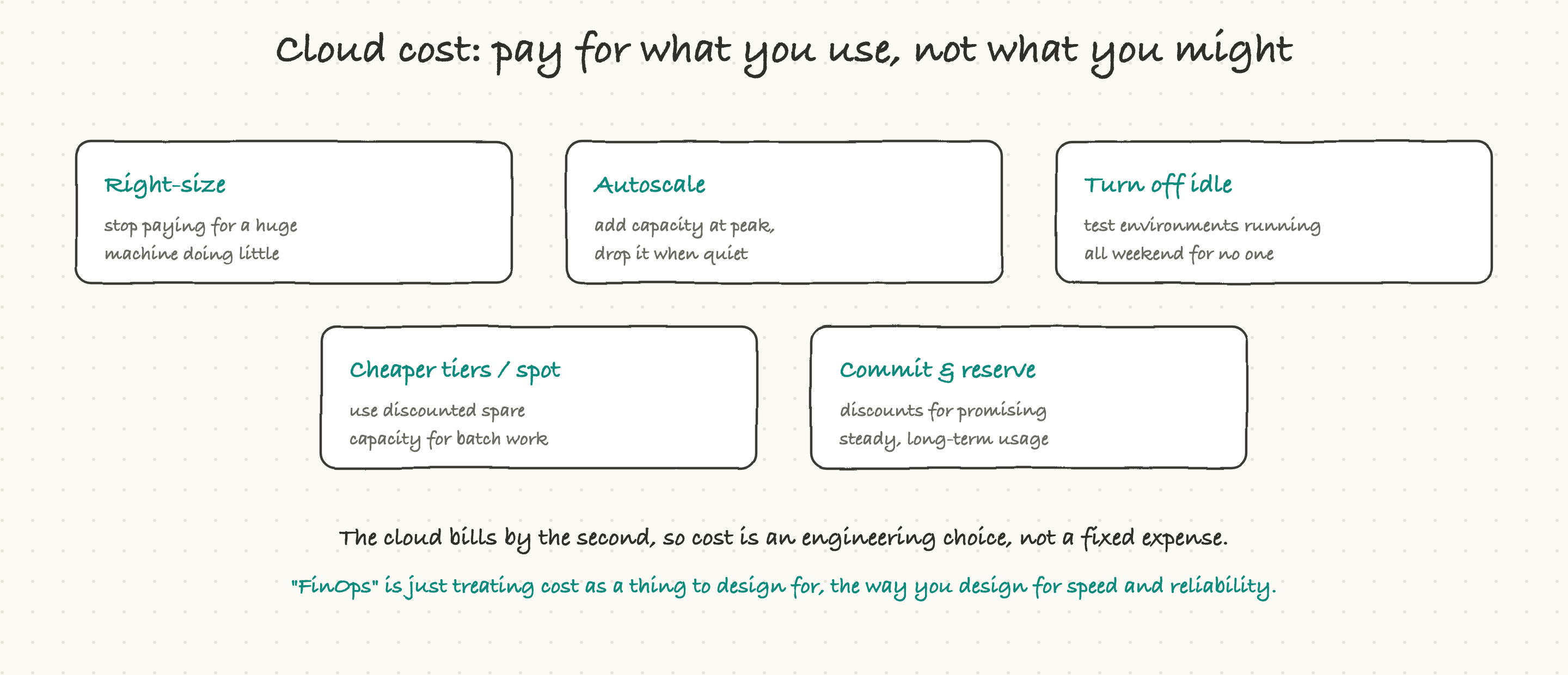
- Right-size. Stop paying for a huge machine that is doing almost nothing. Match the machine to the actual work.
- Autoscale. Add capacity automatically when traffic is high and drop it when things are quiet, instead of paying for peak capacity 24/7.
- Turn off idle things. Test environments left running all weekend, serving no one, are pure waste. Shut them down when not in use.
- Use cheaper tiers. Providers sell spare capacity at a steep discount for work that can tolerate interruption, like overnight batch jobs.
- Commit and reserve. If you know you will use something steadily for a year or more, you can commit to it in advance for a large discount.
Why this matters to a TPM: cloud cost is increasingly a first-class program metric, not just a finance footnote. When you are scaling a product up, ask "what does this do to our cloud bill, and do we have a plan to keep it efficient?" A surprise six-figure cost overrun can derail a program just as surely as a missed deadline, and it is much easier to prevent than to explain after the fact.
What goes wrong
Now that you know the moving parts, here is where delivery actually breaks, so you can spot trouble early:
- Manual, slow deploys. If shipping a change takes days and a long manual checklist, the team ships rarely, batches up lots of risky changes into each release, and is slow to fix problems. Slow delivery is a root cause of many other issues.
- No safe rollout or rollback. Deploying all-at-once with no canary and no quick undo means every deploy is a gamble, and a bad one is a full outage.
- Flaky tests. When the automated tests fail randomly even on good code, people start ignoring failures, and then a real failure slips through. A trustworthy test suite is worth protecting.
- Configuration drift. When test and production environments quietly diverge, you get the classic "worked in test, broke in prod" outage. Containers and IaC exist largely to prevent this.
- Runaway cloud cost. Easy to spin up, easy to forget, and the bill is the surprise at the end of the quarter.
A useful pattern: most production incidents happen during or just after a deploy. That is not a reason to deploy less. It is a reason to make deploys small, automated, observable, and instantly reversible, so that when something does go wrong, the blast radius is tiny and the fix is fast.
Why a TPM should care
You will rarely write a pipeline or configure Kubernetes yourself. But delivery is where your programs live or die, so a few habits pay off enormously:
- Ask how fast and how safe the delivery path is. "Merged to live in how long, with how many manual steps?" and "how do we roll back?" These two questions reveal most of your delivery risk in under a minute.
- Push for small, frequent deploys over big-bang releases. Smaller changes are easier to test, safer to ship, and faster to undo. A big quarterly release is a big quarterly risk.
- Use feature flags to separate the engineering deadline from the launch moment. Code can be live and dark for weeks; you flip the switch when marketing, legal, and leadership are all ready. This single technique removes a huge amount of cross-team scheduling pain.
- Treat reliability and cost as launch criteria, not afterthoughts. "Are we multi-AZ?" and "what happens to our cloud bill at scale?" belong in your launch checklist next to the feature list.
Delivery is the bridge between "the code is done" and "users are happy." It is invisible when it works and catastrophic when it does not. A TPM who understands this bridge, who knows the difference between a canary and a big-bang deploy, who knows why a feature flag can save a launch, is a TPM who can see risk before it becomes an incident. And seeing risk early is most of the job.