Security and Compliance

The handful of ideas that stop most breaches, explained for people who do not write security code
Security has a reputation for being a dark art practiced by specialists, and the deep end truly is. But the great majority of real-world breaches are not exotic. They come from a small set of ordinary mistakes: a weak password, an input nobody checked, a secret left in public, an account with too much access. Which means the fundamentals are very learnable, and a TPM who knows them can spot the missing safeguard in a design review long before it becomes an incident.
You will not implement encryption. But "is this secure?", "are we compliant?", and "how did they get in?" are questions you will be in the room for, and this article gives you the map: how systems decide who you are and what you can do, how they protect data, how they layer defenses, how breaches actually happen, and why the data you collect is a liability as well as an asset.
Two questions at every door: authentication and authorization
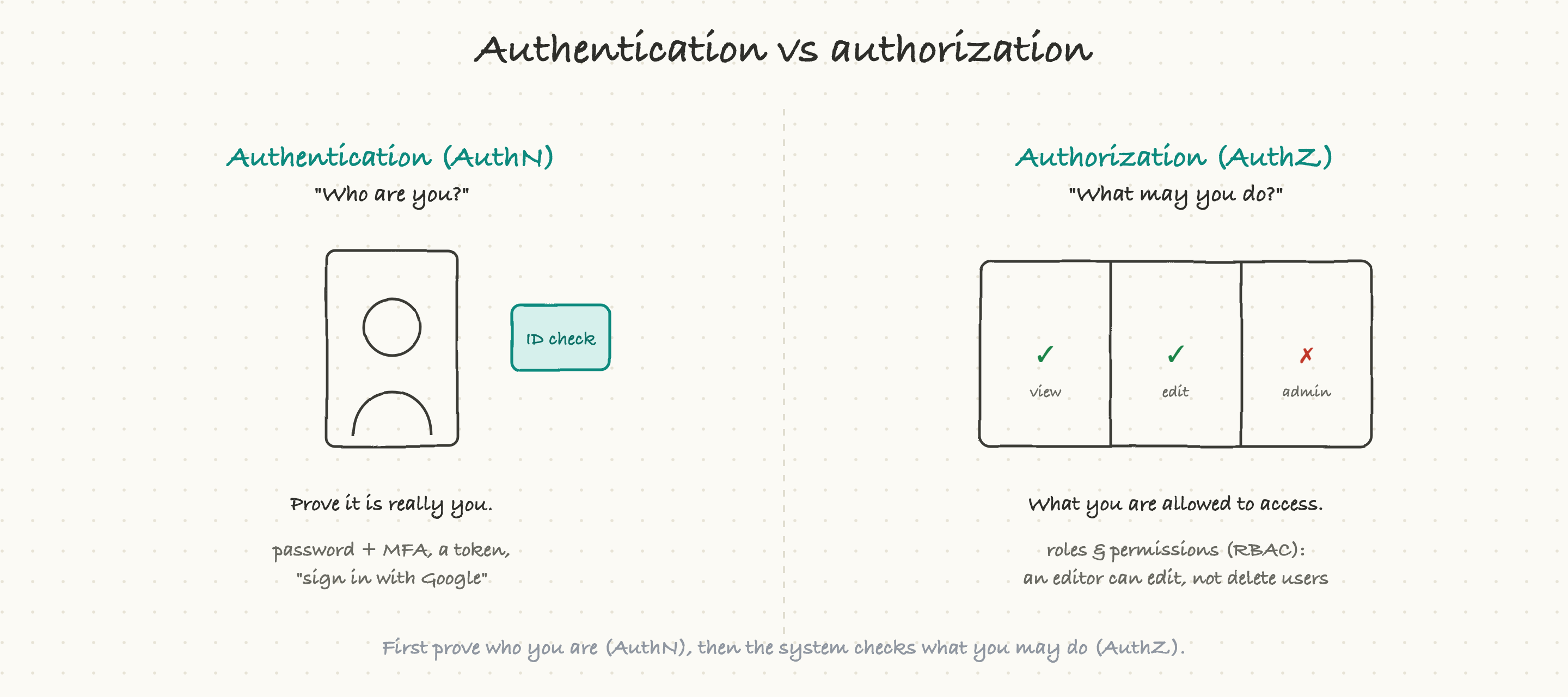
Almost all access control comes down to two questions, and keeping them straight is half the battle.
Authentication (authN) asks "who are you?" It is the ID check at the door: you prove you are who you claim to be. A password does this, but weakly on its own.
Authorization (authZ) asks "what are you allowed to do?" Once the system knows who you are, it checks what that person may access. An editor can edit articles but not delete user accounts; a regular user can see their own data but not everyone else's. This is usually organized as roles with permissions, called role-based access control (RBAC).
The order matters: first authN (prove it is you), then authZ (check what you may do). A huge category of bugs is a system that authenticates correctly but authorizes carelessly, letting a logged-in user reach data that is not theirs just by changing an id in the URL. When you hear "broken access control," that is authZ failing after authN succeeded.
How identity actually works
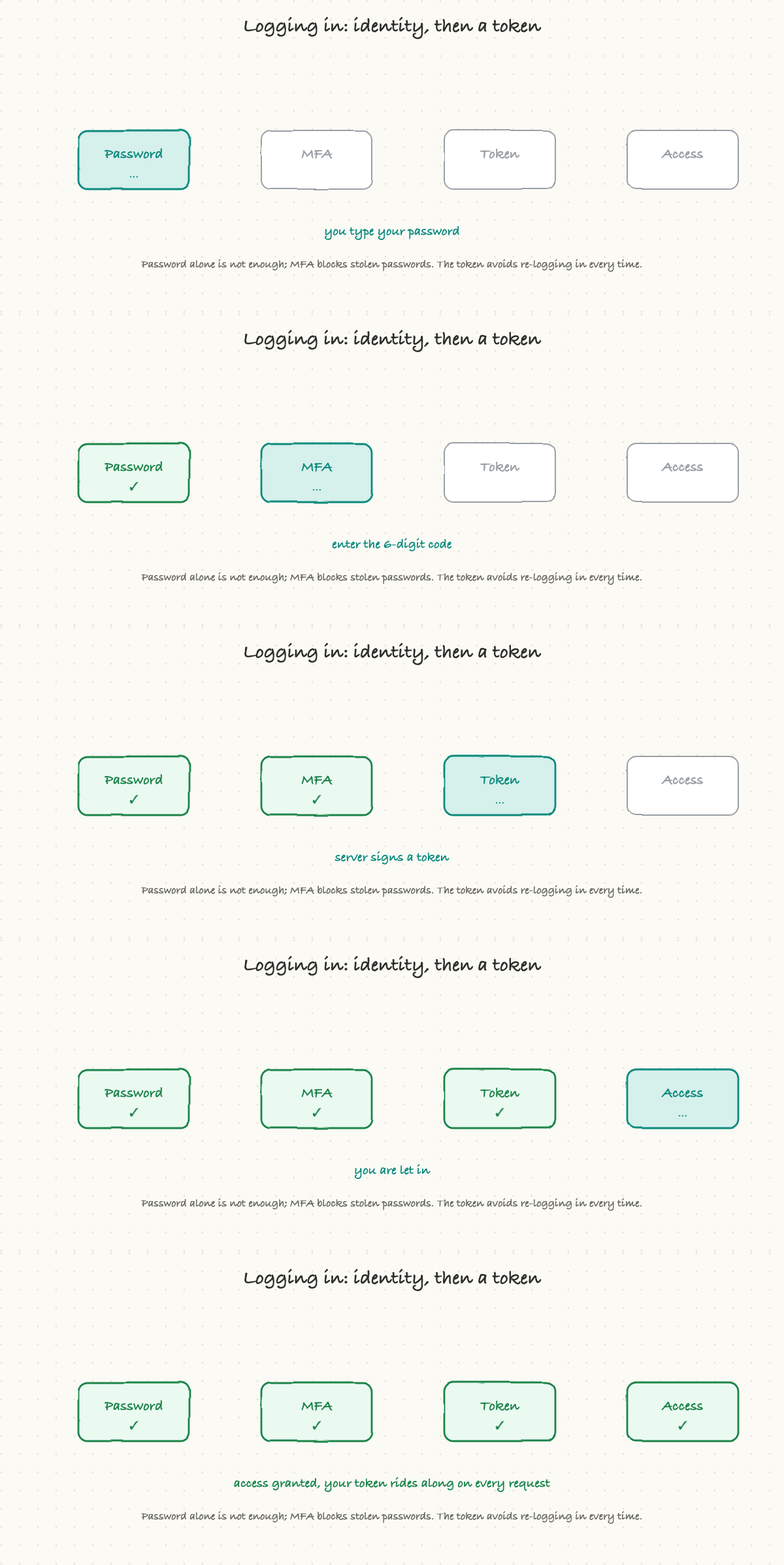
Authentication has a few moving parts worth recognizing.
Passwords are the baseline, and the key fact is that a well-built system never stores your actual password. It stores a hash, a scrambled, one-way fingerprint of it, so that even if the database is stolen, the passwords cannot be read back out. If anyone can tell you your forgotten password (rather than resetting it), that is a serious red flag.
Multi-factor authentication (MFA) adds a second proof beyond the password, usually a code from your phone. This is the single most effective security measure there is, because it defeats stolen and reused passwords, which are behind a huge share of breaches. "Turn on MFA" is the highest-leverage security advice in existence.
Tokens and single sign-on handle the "do I have to log in constantly?" problem. After you authenticate once, the system gives you a signed token (often a JWT, from the API article) that rides along on each request to prove you are still you, without re-entering your password every time. Single sign-on (SSO) lets one login work across many apps, which is both convenient and safer, because there is one well-guarded front door instead of many weak ones. OAuth, the "sign in with Google" mechanism, lets you grant one app limited access to your account on another without sharing your password.
You do not need to build any of this. You need to recognize that passwords should be hashed, MFA should be on, and access should be granted through tokens and roles, not ad hoc checks.
Encryption: scrambling the data
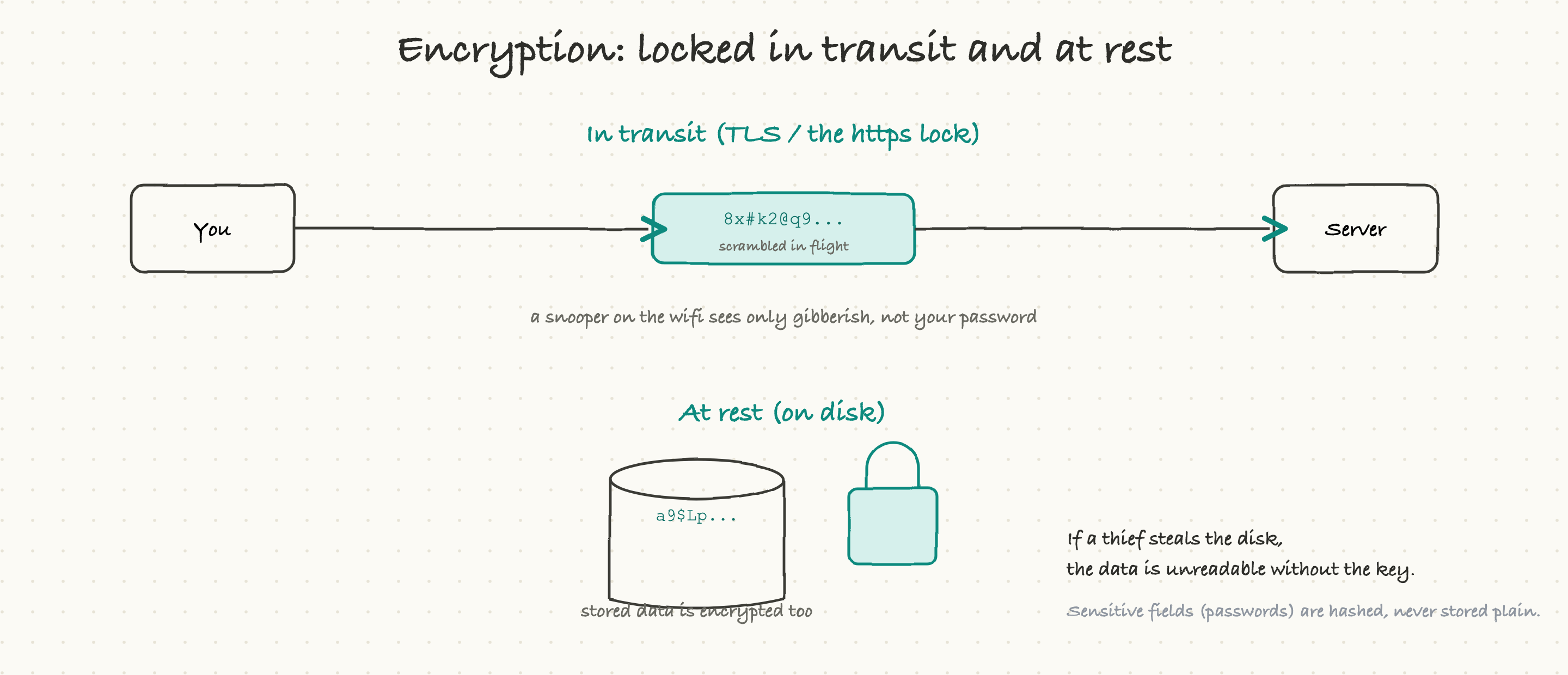
Encryption is how data is kept private even if someone intercepts or steals it, and it shows up in two places.
In transit means while data travels the network. This is what the https lock means: the connection is encrypted with TLS, so anyone snooping in between, on the coffee-shop wifi, at the internet provider, sees only scrambled gibberish instead of your password or card number. Today, essentially everything should be encrypted in transit; plain unencrypted traffic is a red flag.
At rest means while data sits on disk in a database or storage. Encrypting it there means that if someone physically steals the drive or breaks into the storage, the data is unreadable without the key. Sensitive data, especially passwords, is also hashed or encrypted at the field level, so even a database dump does not hand over the crown jewels.
The mental model is simple: data should be locked both while it moves and while it rests, so that intercepting the line or stealing the disk both yield nothing useful. When a team says "it's encrypted in transit and at rest," those are the two halves they mean.
Defense in depth: many walls, not one
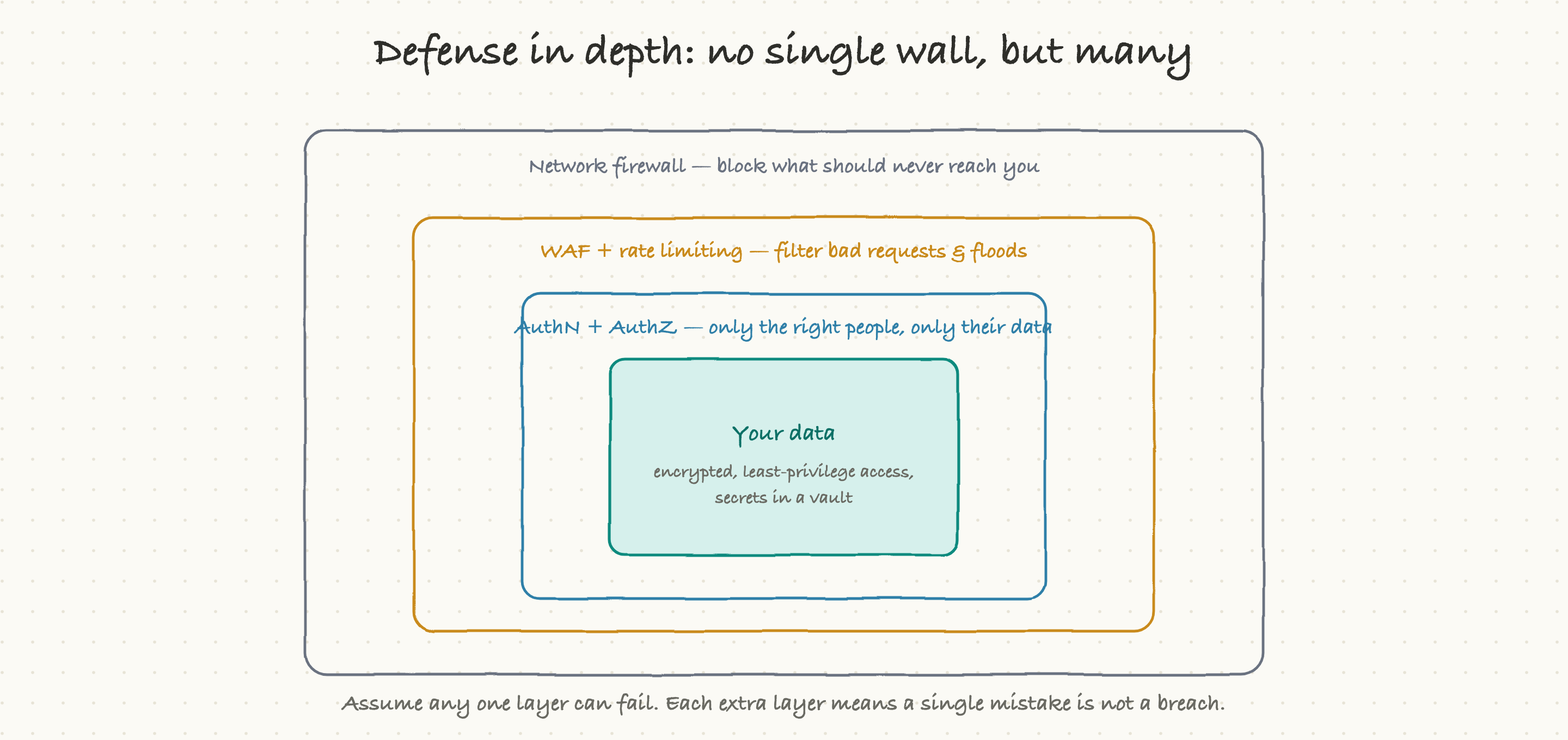
The single most important security principle is this: never rely on one wall. Assume any individual protection can fail, a firewall misconfigured, a bug slipping through, a password phished, and build so that one failure is not a breach. This is called defense in depth, and it means stacking independent layers.
A network firewall blocks traffic that should never reach you in the first place. A web application firewall (WAF) and rate limiting filter out malicious requests and floods. Authentication and authorization ensure only the right people reach only their own data. The data itself is encrypted, access is limited to the few systems that truly need it (least privilege), and secrets like keys live in a guarded vault, not in the code.
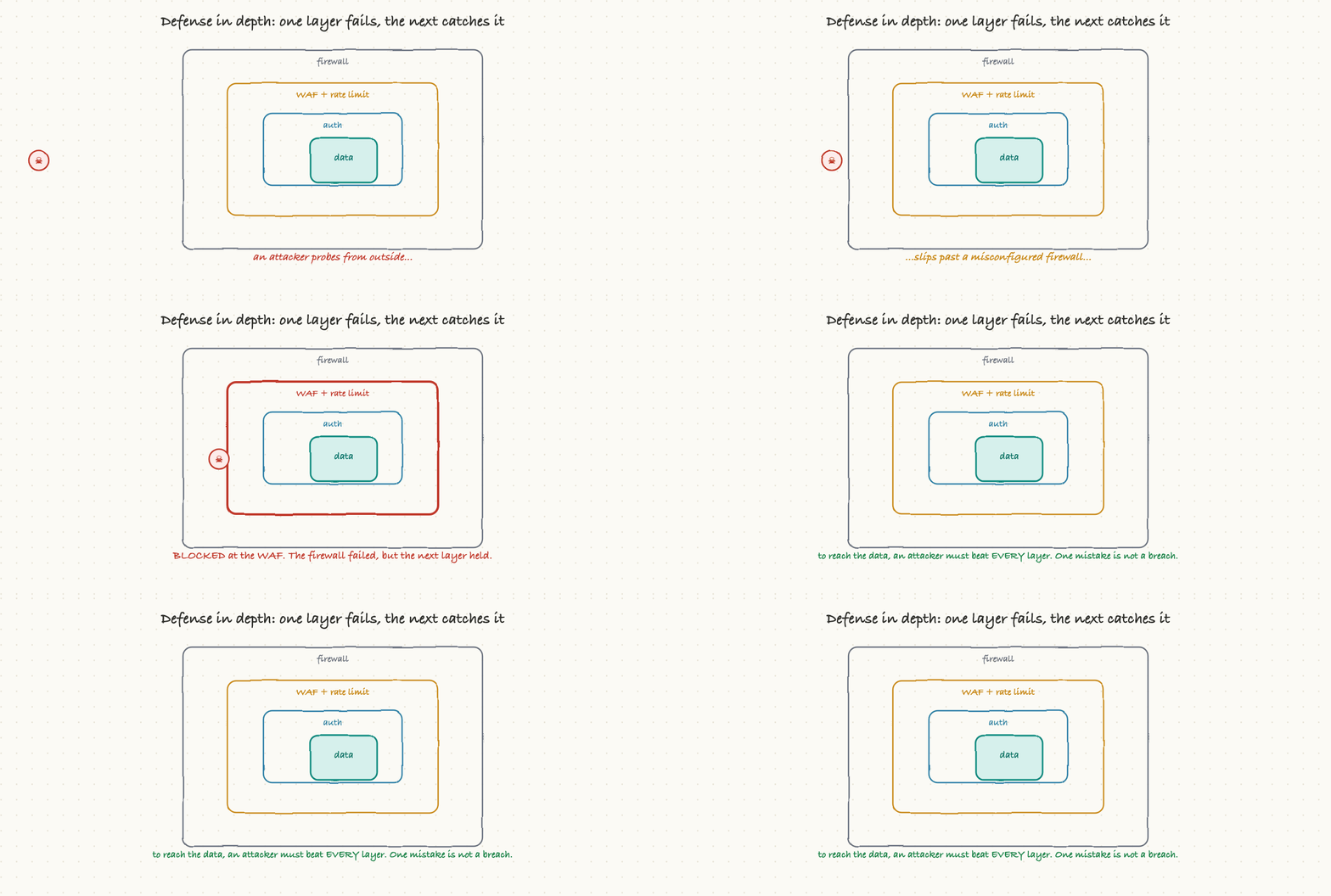
The payoff is that an attacker has to defeat every layer to get to anything valuable. If the firewall is misconfigured, the WAF still catches the attack. If a bug slips past that, authorization still blocks access to the data. No single mistake becomes a catastrophe. When you review a design and there is exactly one thing standing between the internet and the customer data, that is the smell of missing depth.
How breaches actually happen
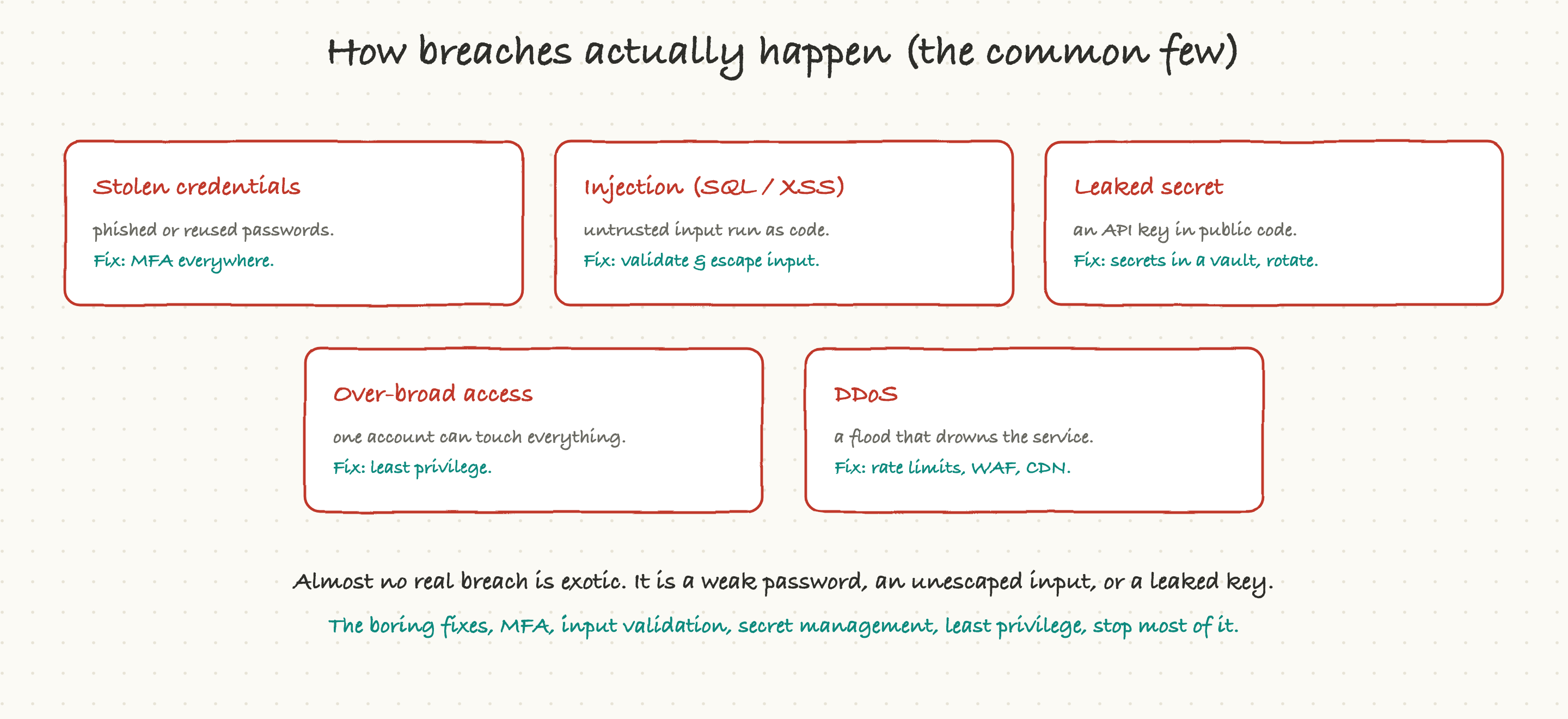
It is worth seeing how real breaches happen, because the list is short and unglamorous, and knowing it tells you exactly what to ask about.
Stolen credentials: phished or reused passwords. The fix is MFA. Injection: untrusted input that gets run as code, the classic being SQL injection (input that becomes a database command) and XSS (input that becomes a script in someone's browser). The fix is to validate and escape every input, never trust what a user sends. Leaked secrets: an API key or password committed to public code. The fix is to keep secrets in a vault and rotate them. Over-broad access: one account or service that can touch everything, so compromising it compromises the whole system. The fix is least privilege, give each thing only the access it needs. And denial of service (DDoS): a flood of traffic designed to drown the service. The fix is rate limiting, a WAF, and a CDN to absorb it.
Notice the pattern: almost no real breach is a movie-style genius hack. It is a weak password, an unescaped input, or a leaked key, and the fixes are boring and known. The value of a TPM here is making sure the boring fixes are actually in place, because they usually are not until someone asks.
Privacy and compliance: the data you keep is a liability
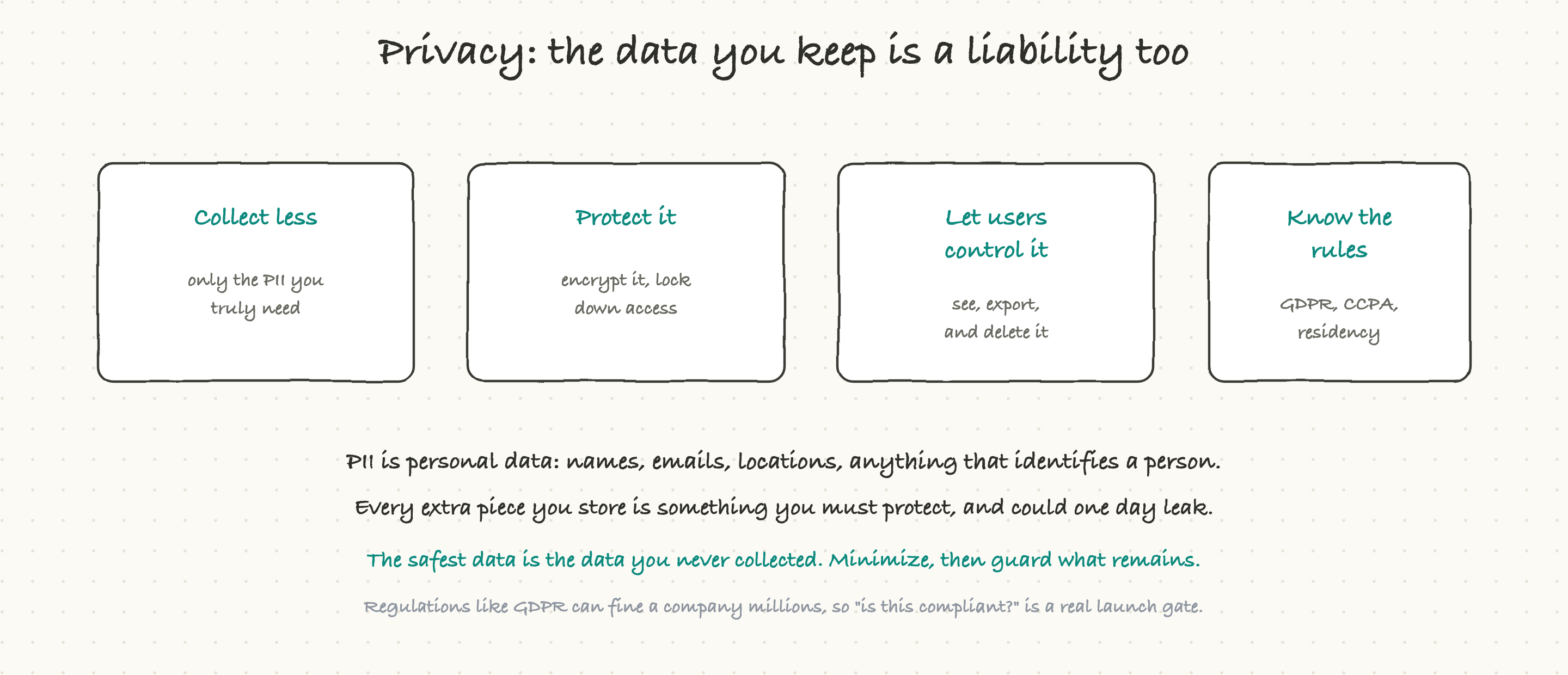
Security protects data from attackers. Privacy and compliance are about whether you should have the data at all, and what you owe the people it belongs to. For a TPM, this is increasingly a real launch gate, not a footnote.
The core idea is that personal data (PII, anything that identifies a person: names, emails, locations, device IDs) is a liability as much as an asset. Every extra piece you collect is something you now have to protect, and something that could one day leak and harm both your users and your company. So the discipline is data minimization: collect only what you genuinely need, protect what you keep with encryption and tight access, let users see, export, and delete their own data, and know the regulations that apply.
Those regulations have teeth. Laws like GDPR in Europe and CCPA in California grant people rights over their data (including the right to be deleted) and can fine a company millions for mishandling it. There are also data residency rules about where data is allowed to physically live. The upshot is that "is this compliant?" and "do we actually need to collect this?" are questions worth asking before a feature ships, not after a regulator calls. The safest data, and the cheapest to protect, is the data you never collected.
Why a TPM should care, and what to ask
Security and privacy failures are among the most damaging things that can happen to a product, and the safeguards are usually missing not because they are hard, but because nobody asked. A few questions catch most of it:
Is MFA required, especially for anything administrative? (The single highest-leverage one.)
Where are our secrets, in a vault, or sitting in the code and config?
If this one component is compromised, what can it reach? (The least-privilege, blast-radius question.)
Is data encrypted both in transit and at rest, and are passwords hashed?
For user input, are we validating and escaping it, so it cannot become injection?
What personal data are we collecting, do we truly need all of it, and is this compliant with the rules that apply?
Ask those, and you will catch the missing MFA, the leaked secret, the over-privileged service, and the unnecessary pile of personal data, which together are the source of most breaches and most compliance trouble. Security is not mainly about brilliance; it is about not skipping the boring, known protections, and that is exactly the kind of discipline a good TPM brings.