Storage

Where your files actually sit, and why the cloud bill is usually a storage bill
Databases hold the structured records, the accounts, the orders, the messages. But a huge share of what a system keeps is not records at all. It is files: photos, videos, backups, log files, documents, machine-learning data. Storing those well is its own discipline, and it quietly governs the two things every program cares about: how much it costs and how fast it feels. Get storage right and nobody thinks about it. Get it wrong and you get a shocking bill, a slow app, or, worst of all, lost data.
You will not configure a storage system. But you sit where cost overruns and "where did our data go" get discussed, and a clear picture of how storage works lets you ask the questions that catch those before they hurt. Here is the whole map.
Three ways to store data
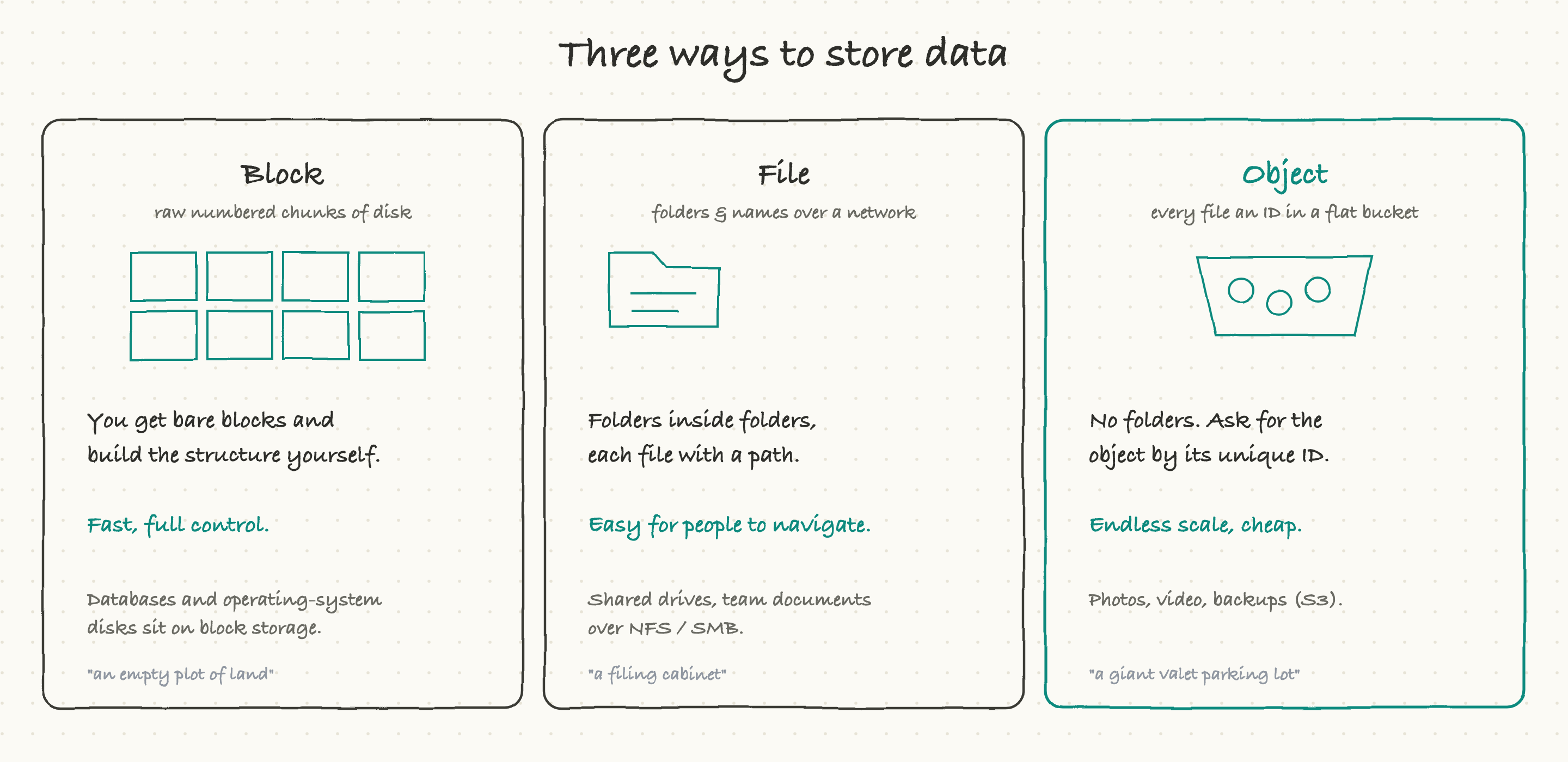
There are three fundamental kinds of storage, and almost everything is one of them.
Block storage is the rawest form. The system hands you bare, fixed-size chunks of disk, called blocks, numbered but otherwise empty, and you build whatever structure you want on top. It is fast and gives total control, which is exactly why the things that need both, databases and the operating system's own disk, sit on block storage. Think of it as an empty plot of land: powerful, but you put up the building.
File storage is what you know from your own computer: folders inside folders, each file with a name and a path. It is organized for humans to navigate. Shared file storage lets many machines mount the same folders over a network (the protocols are called NFS and SMB), which is how teams share documents and how some applications share files. Think of it as a filing cabinet.
Object storage is the modern workhorse, and it deserves the most attention because it is where most of the world's data now lives. Instead of folders, every file is an "object" with a unique id, dropped into a giant flat pool called a bucket. There are no folders to walk and no servers to choose; you just ask for the object by its id. It scales essentially without limit and is cheap. Think of it as an enormous valet lot: you do not know or care where your car is parked, you just hand over the ticket.
Most real apps use all three: object storage for the big static files, block storage under the database, and maybe file storage for shared documents. They are not competitors so much as different tools for different jobs.
Object storage: the workhorse of the cloud
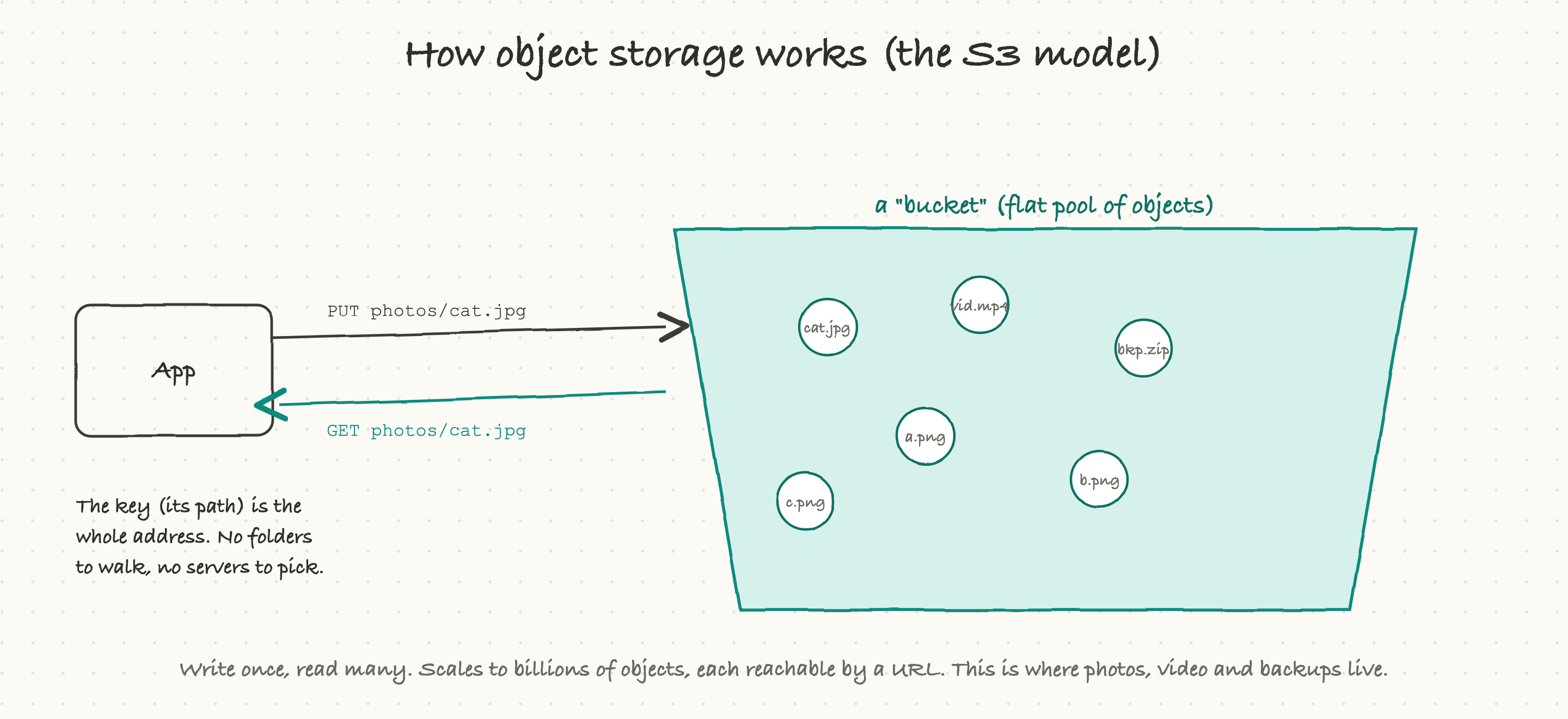
Because object storage is everywhere, it is worth understanding how it actually works, and the famous example is Amazon S3 (with Azure Blob and Google Cloud Storage as the equivalents).
You create a bucket, a named container. Then you store objects in it, and the key thing is the key: each object has a unique path-like name, say photos/2026/cat.jpg, and that name is its entire address. To save a file you PUT it with a key; to read it you GET it by that key. There are no real folders, just a flat namespace where the slashes in the key are only there to look tidy.
A few properties make object storage special. It scales to billions of objects without you doing anything. Every object can be reached by a URL, which is why a CDN sits so naturally in front of it. And objects are typically treated as immutable: you do not edit them in place, you write a new version. This "write once, read many" nature is what lets it be so cheap and so durable. The trade-off is that it is not built for the constant tiny updates a database does, which is exactly why databases sit on block storage instead.
When an engineer says "just put it in the bucket," this is what they mean: cheap, near-infinite storage for files, each addressable by a key.
Durability: why you won't lose it (and where backups still matter)
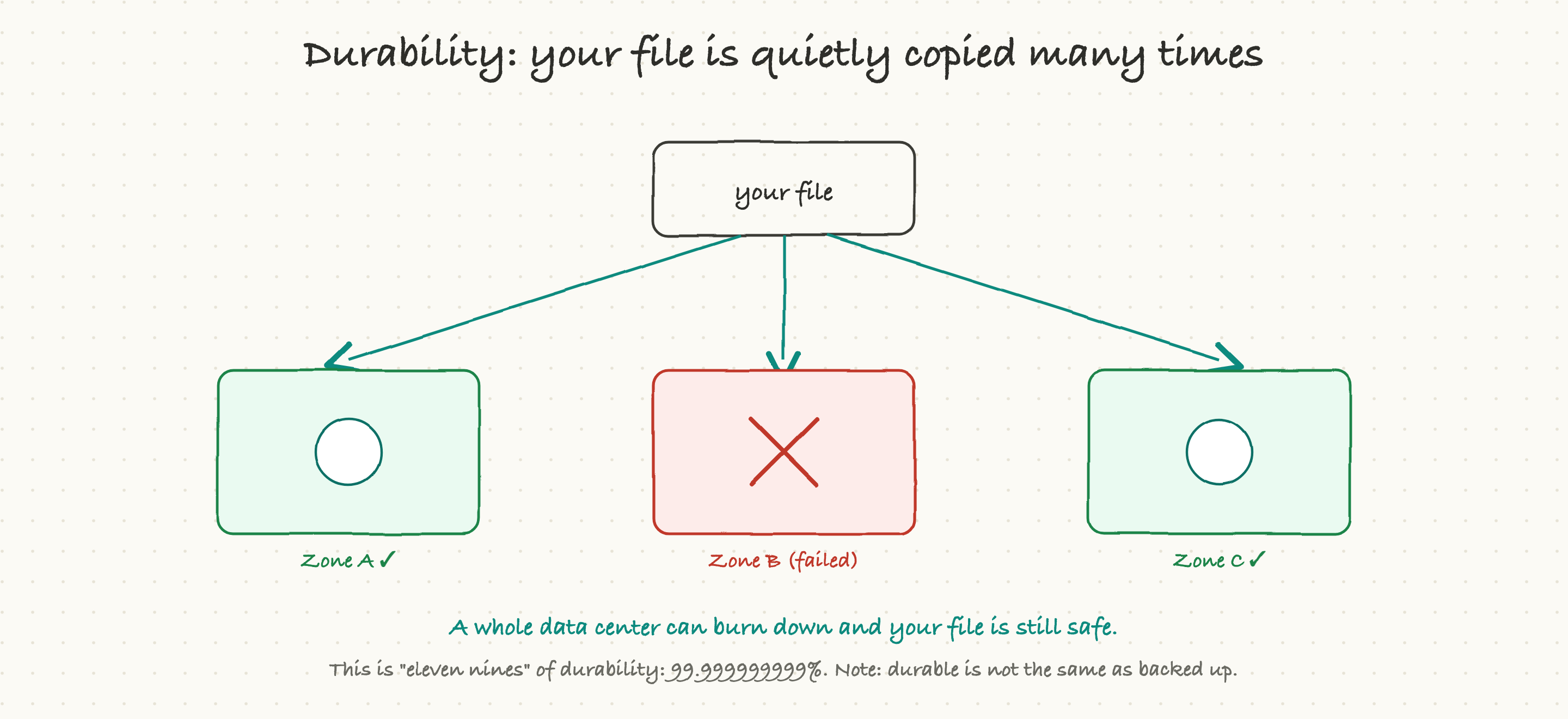
Here is something that sounds like magic until you see how it works: good storage almost never loses your data. Object storage providers advertise things like "eleven nines" of durability, which is 99.999999999 percent, meaning if you stored ten million files you might expect to lose one over ten thousand years. How?
The answer is copies. Behind the scenes, every object is automatically stored multiple times, spread across separate physical locations called availability zones, often with a clever technique called erasure coding that lets the system rebuild a file from a subset of its pieces. If a disk dies, or a whole data center burns down, your file is still safe in the other zones, and the system quietly makes a fresh copy to get back to full strength.
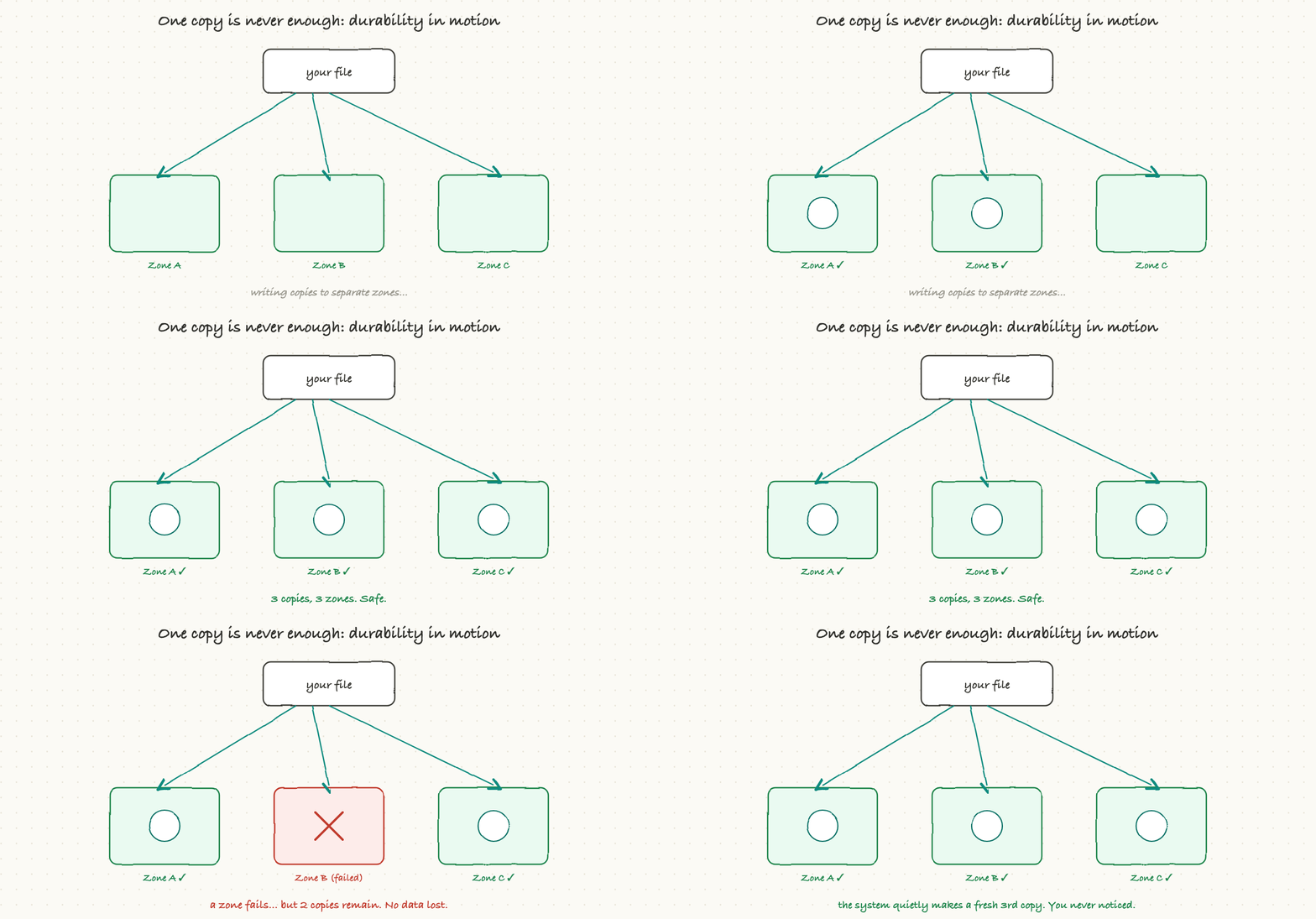
But here is the trap that catches teams, and it is worth burning into memory: durable is not the same as backed up. Durability protects you from hardware failure. It does not protect you from yourself. If your code deletes the wrong files, or someone fat-fingers a command, or ransomware encrypts your data, that bad change is faithfully copied to all those durable replicas. The data is "safely" gone. So you still need real backups and versioning (keeping old copies of objects) to recover from mistakes, not just from disk failures. "It's on durable storage" is not a backup strategy.
Storage tiers and the cloud bill
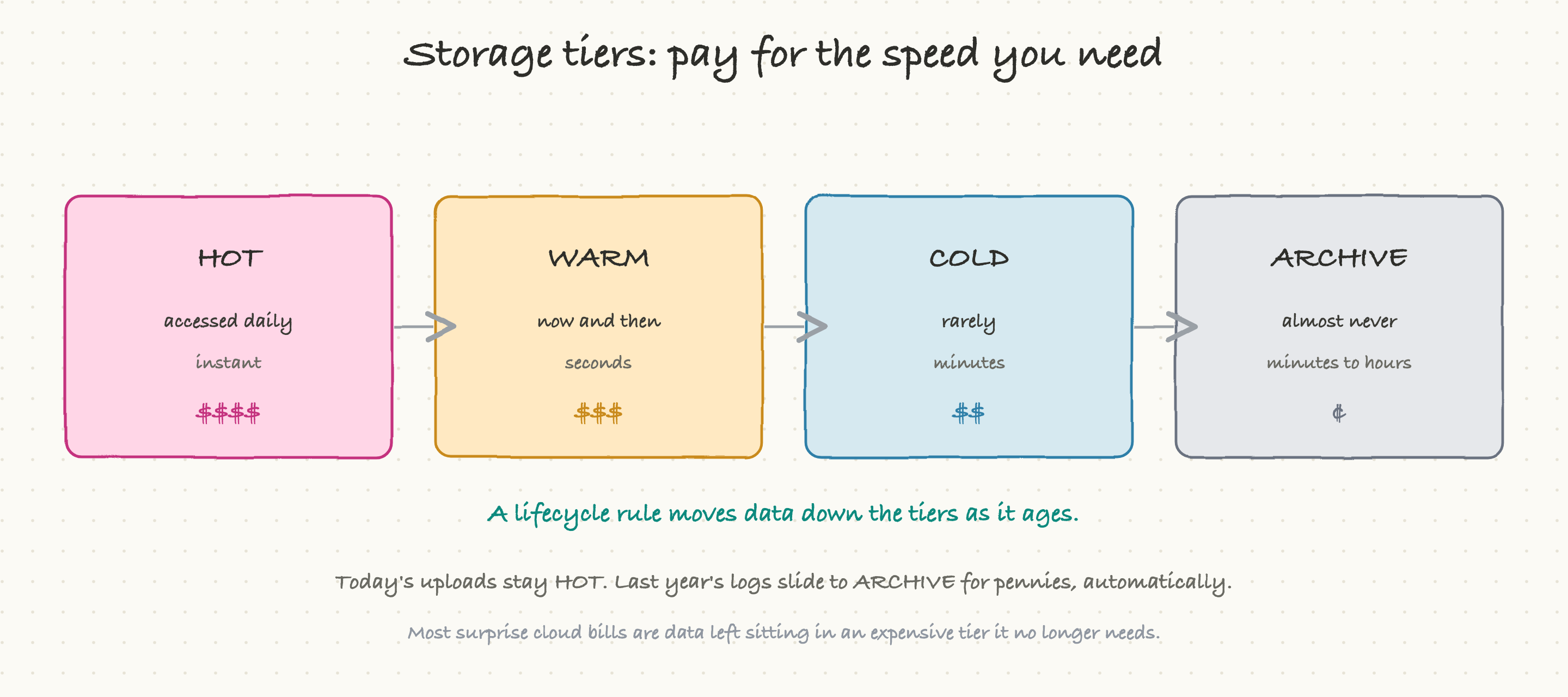
Now the money. Not all stored data is used equally. Today's uploads get accessed constantly; last year's logs almost never. Charging the same high price to keep both instantly available would be wasteful, so storage comes in tiers that trade access speed for cost.
Hot storage is instant and most expensive, for data used daily. Warm is a bit cheaper for data touched now and then. Cold is cheaper still for rarely-accessed data, where you accept a small delay to retrieve it. And archive is dirt cheap, for data you almost never need, where retrieval can take minutes to hours. The colder the tier, the less you pay to keep it and the longer you wait to get it back.
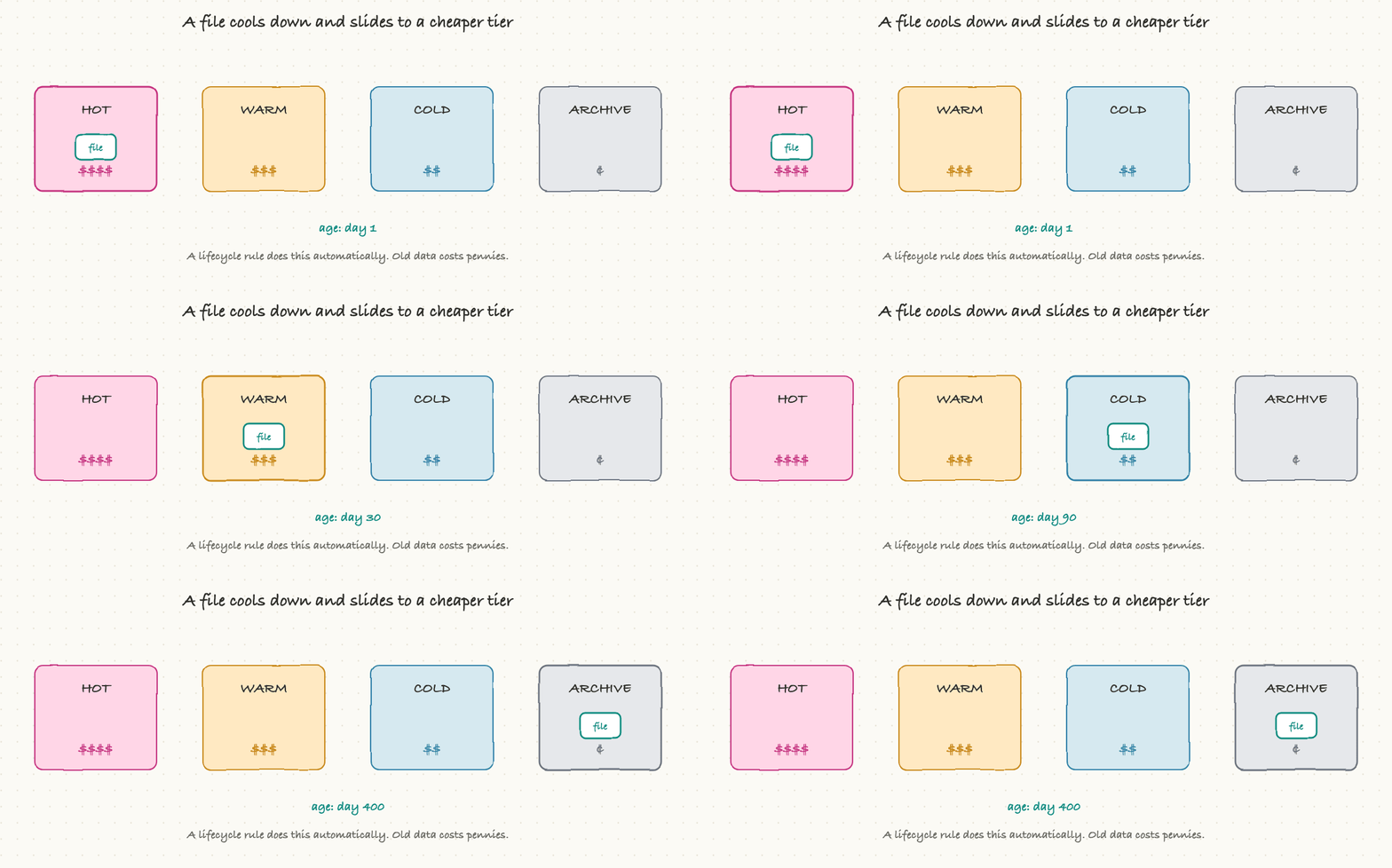
The powerful move is a lifecycle rule: an automatic policy that moves data down the tiers as it ages. Keep the last 30 days hot, then slide it to cold after 90 days, then to archive after a year, all without anyone lifting a finger. This is where real money is saved, and its absence is where real money is wasted. The single most common cause of a shocking cloud storage bill is data sitting in an expensive tier it long ago stopped needing, terabytes of old logs and forgotten backups being kept "just in case" at hot prices. When someone says "our storage costs exploded," the first question is almost always: do we have lifecycle rules, and is anything cleaning up old data?
Speed has three different meanings
When people say storage is "fast" or "slow," they could mean three different things, and mixing them up causes confusion.
Latency is the time to get the first byte, how long until it starts responding. Throughput is how much data per second it can move once it gets going (megabytes per second). IOPS is how many separate operations per second it can do, which matters for workloads doing lots of tiny reads and writes, like a database.
A backup job cares about throughput; it moves huge files and just wants them to flow fast. A database cares about IOPS and latency; it does many small operations and wants each to be quick. Picking storage means matching it to which of these the workload actually needs, fast object storage for big sequential files, high-IOPS block storage under a busy database.
Where should this data live?
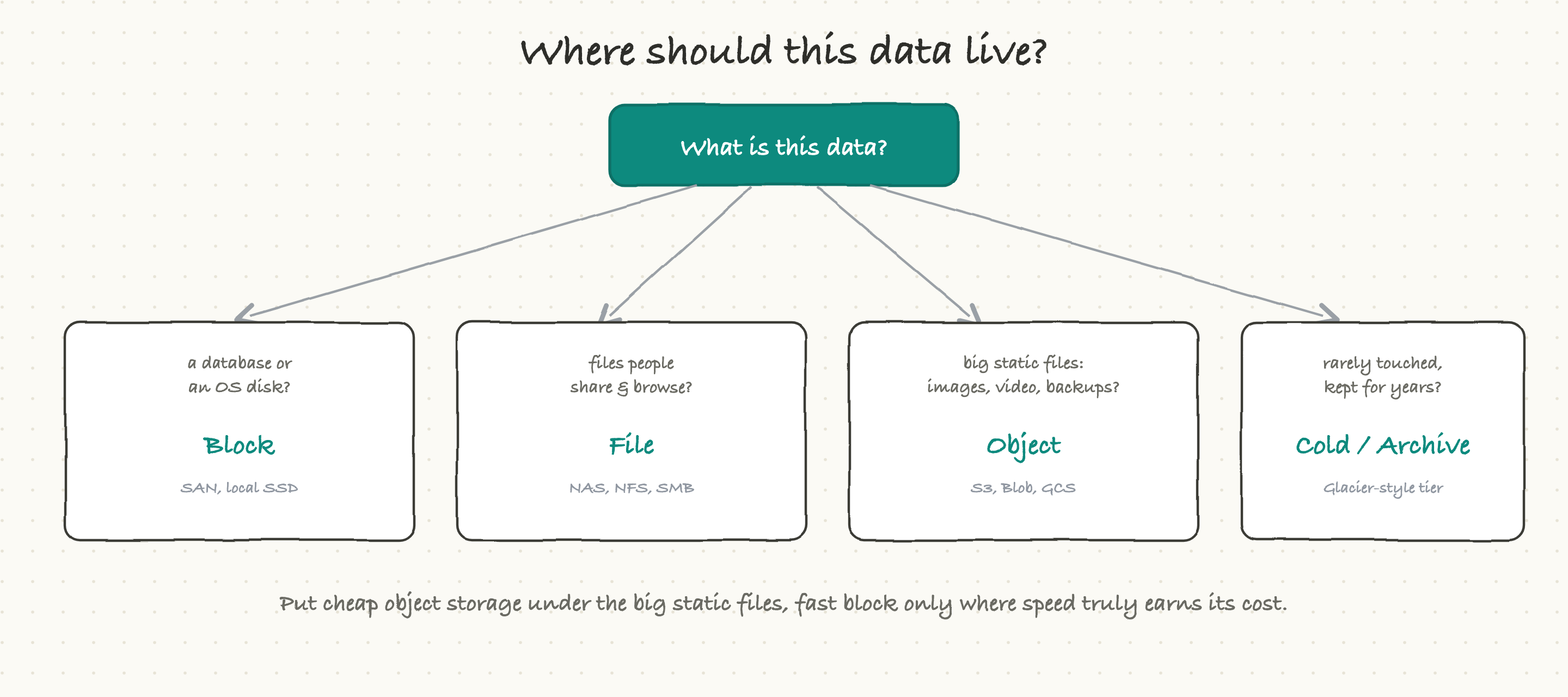
Put it together and the decision is simple to reason about. Start with what the data is and how it will be used:
A database or an operating-system disk, needing speed and fine-grained writes? Block storage.
Files that people share and browse together? File storage (NAS, NFS, SMB).
Big static files, images, video, backups, datasets? Object storage (S3 and friends), almost always.
Data you rarely touch but must keep for years, old logs, compliance records? A cold or archive tier.
The instinct to default to expensive, fast storage for everything is exactly what runs up the bill. The discipline is the reverse: put cheap object storage under the big static files, reserve fast block storage for the places that truly need it, and let lifecycle rules sweep the rest into cold tiers as it ages.
What actually goes wrong
A handful of patterns cause most storage pain:
The runaway bill. No lifecycle rules, data kept in hot tiers forever, orphaned files nobody owns. Storage is the silent line item that grows until someone finally looks.
Durable, but not backed up. A bad delete or a bug wipes data, the change replicates to every durable copy, and there is no backup or versioning to roll back to. The data was "safe" right up until it was gone.
Big files in the database. Someone stores images or videos as blobs inside the database instead of in object storage, bloating it, slowing it down, and making it expensive to scale. Big files belong in object storage with just a link kept in the database.
No CDN in front. Object storage is served directly to far-away users, which is both slow and, because providers charge to move data out (egress), surprisingly expensive. A CDN fixes both.
The egress surprise. Storing data is cheap; moving it out of the cloud often is not. Teams discover this when they try to leave a provider or move data between regions and meet a large transfer bill.
Why a TPM should care, and what to ask
You will not pick the storage class. But you can ask the questions that keep storage from becoming a slow bleed of money or a data-loss incident:
For these files, are we using object storage, or are they sitting somewhere more expensive than they need to be?
Do we have lifecycle rules moving old data to cheaper tiers, and is anything ever deleted?
Durability aside, do we have actual backups and versioning, so we can recover from a bad delete, not just a disk failure?
Is there a CDN in front of our static content, both for speed and to avoid egress costs?
Before we move or export a lot of data, what will the transfer cost?
Ask those, and you will catch the storage decisions that quietly determine the cloud bill and whether the company can recover when, not if, someone deletes the wrong thing.