Document Databases: When Your Data Wants to Be Whole

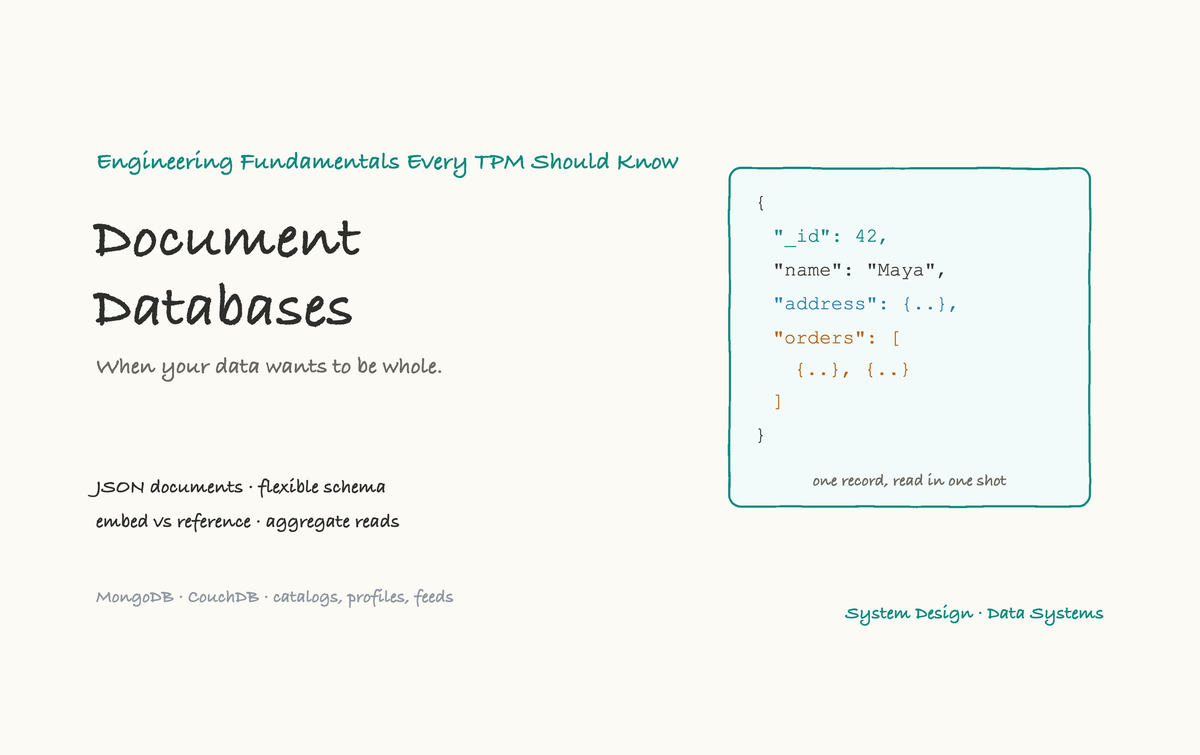
The relational database we covered in the last deep-dive is brilliant at one thing above all: taking your data apart into tidy, non-repeating tables. That is its great strength. But it is also, for some kinds of work, its great inconvenience. A lot of the time, the thing you actually want to load is a whole object, a complete user profile, an entire product listing, one full order with all its line items, and having that object scattered across six tables that you must join back together every single time starts to feel like fighting your own database.
Document databases take the opposite stance. Instead of splitting an object into pieces, they store it whole, as a single self-contained document. This article is the deep-dive on that family. It builds on the evolution overview and pairs with the relational deep-dive, and by the end you will understand what a document actually is, the one modeling decision that matters most, why these databases scale so naturally, and where they get you into trouble.
What a document actually is
A document is just a structured record, almost always written in JSON, the same simple, readable format used all over the web. A document has named fields with values, and crucially, those values can themselves be objects or lists. That means a document can hold nested and repeating data inside itself.
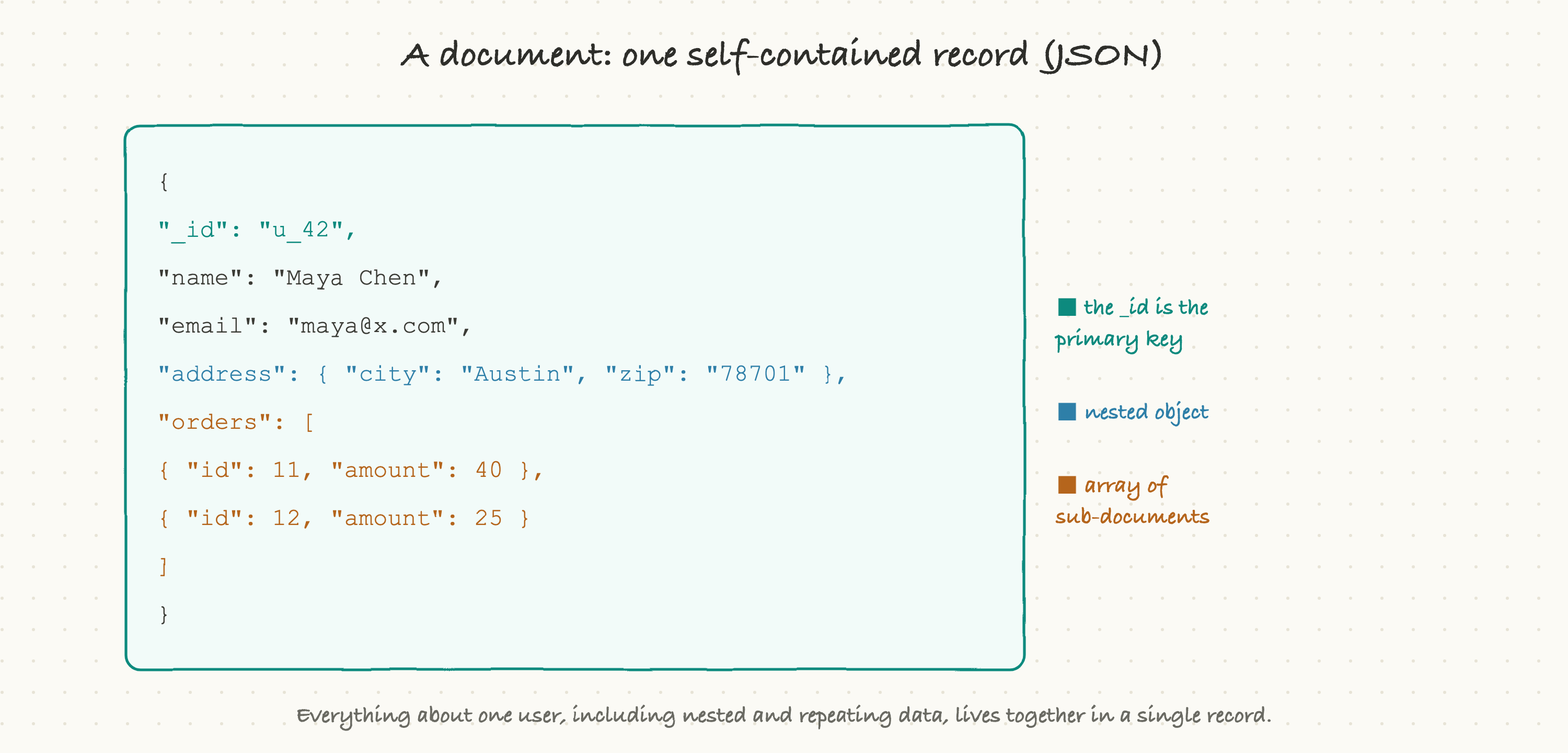
Look at that example. A single user document holds the basic fields you'd expect (name, email), but it also contains a nested address object, and an orders array holding several sub-documents, all inside the one record. There is a unique _id that acts as the primary key, exactly like in a relational database. But everything about this user, including data that a relational database would have pushed out into separate addresses and orders tables, lives together in one place.
Documents are grouped into collections (the rough equivalent of a table), but a collection is far more relaxed than a table, as we'll see. MongoDB and CouchDB are the document databases you are most likely to hear named. MongoDB actually stores documents in a binary format called BSON under the hood, but you can think of it as JSON; the experience is the same.
The same data, whole instead of scattered
The cleanest way to feel the difference is to put the two models side by side with identical data.
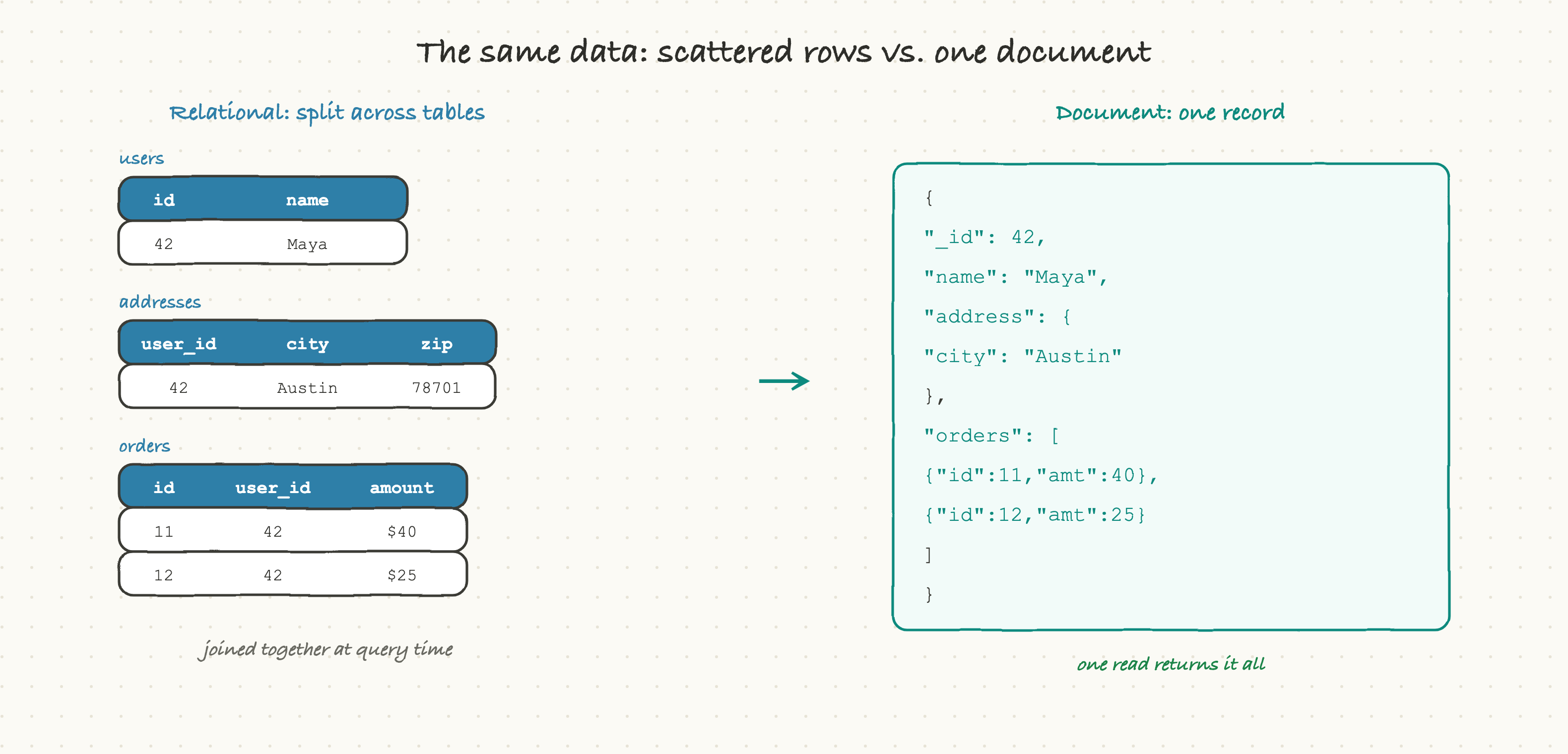
On the left, the relational version does what relational databases do: it splits the user across a users table, an addresses table, and an orders table, tied together by keys. To show that user's full profile, you join all three back together at query time. It is clean and non-repeating, and it is also three tables and a join for what is, conceptually, one thing.
On the right, the document version stores that same user as a single document with the address nested and the orders embedded as an array. To load the whole profile, you read one document. No joins, no stitching, just "give me document 42."
Neither is universally better. The relational version is tidier and avoids duplication. The document version matches the shape of how the data is actually used, when you almost always want the whole user at once. That phrase, "the shape of how the data is used," is the heart of document database thinking.
Flexible schema: no migration required
Here is where document databases feel genuinely different day to day. In a relational database, the table's structure (its schema) is fixed and enforced. Every row must have the same columns. To add a new field, you run a schema migration that alters the table, and on a large live table that can be a slow, carefully planned operation.
Document databases are schema-flexible. A collection does not force every document to have the same shape.
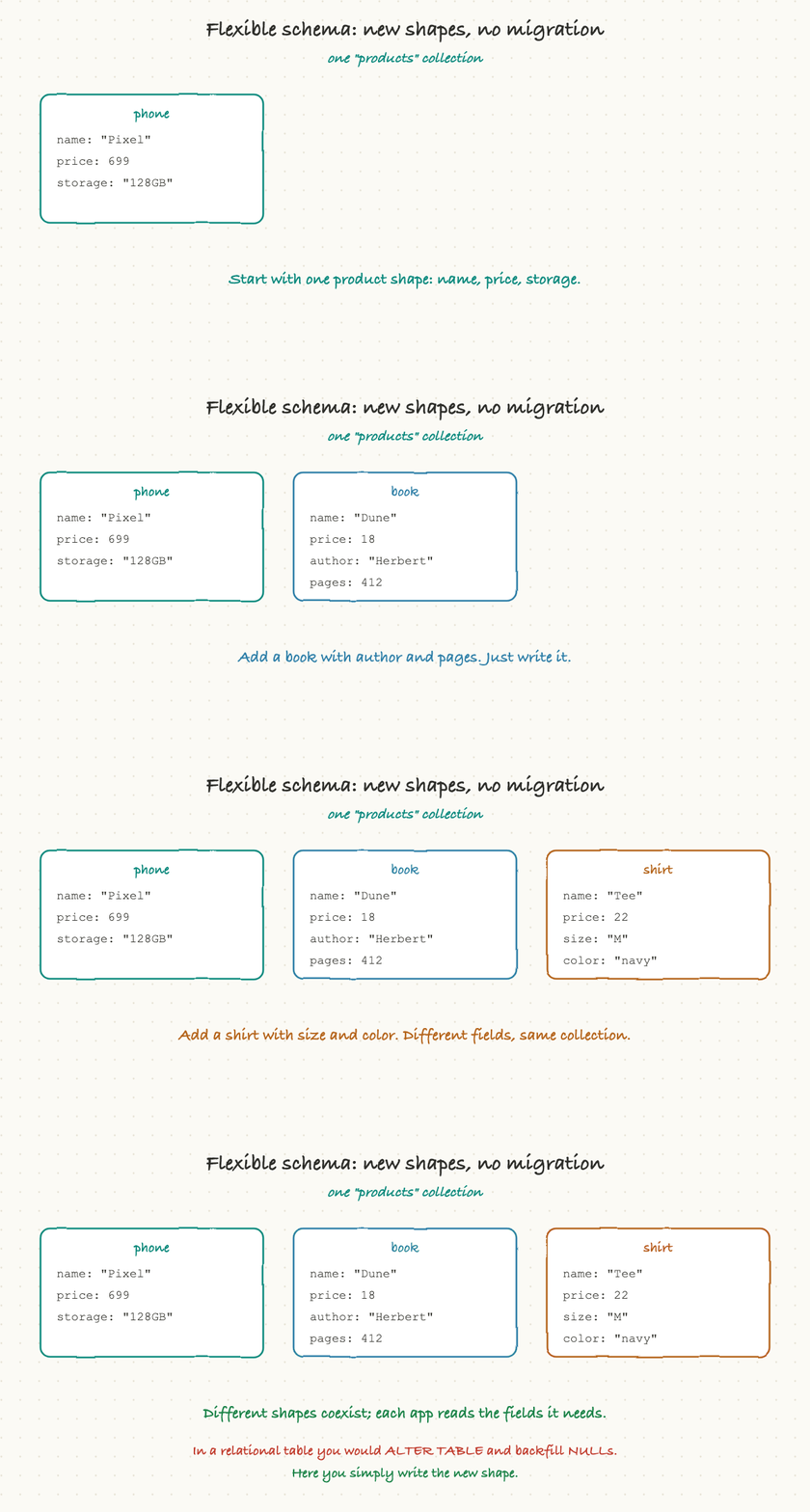
Watch what that allows. You start with a simple product, then add a book with author and pages, then a shirt with size and color, all into the same products collection, each with completely different fields. There is no ALTER TABLE, no migration, no backfilling other rows with nulls. You just write the new shape and it's stored.
This is a real superpower for products that evolve quickly or for data that is genuinely irregular. A product catalog where every category has different attributes, user profiles that gain new fields over time, event data whose structure keeps changing, all of these fit naturally where a rigid table would mean constant migrations.
The flip side, and it's important, is that the discipline moves from the database to your application. The database will happily store a document missing a field or with a typo in a field name, because it isn't enforcing a schema. So your code now has to handle the fact that older documents might have a different shape than newer ones. Schema flexibility doesn't make the schema problem disappear; it moves it out of the database and into the application, where it's your job to manage. That is a trade, not a free lunch.
The one decision that matters most: embed or reference
If you remember one thing about modeling data in a document database, make it this. When one thing relates to another, you have two choices: embed the related data directly inside the document, or reference it by storing an id that points to a separate document.
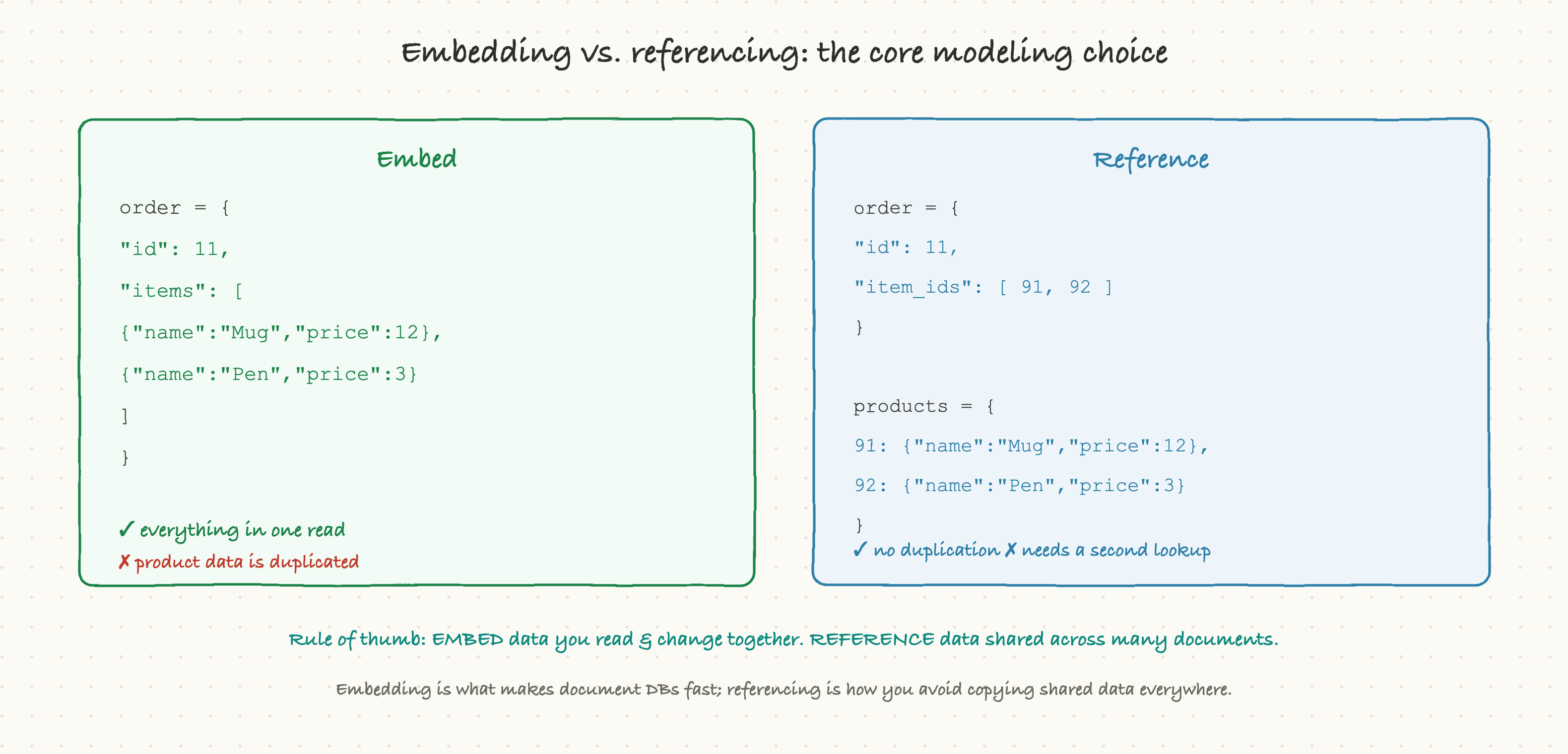
Embedding puts the related data right inside the parent. An order document contains its line items as a nested array. The win is huge: you read the order and you instantly have everything, in one operation, no second lookup. The cost is duplication. If you embed a product's details inside every order that contains it, and the product's name changes, you now have copies scattered across thousands of orders.
Referencing stores just a pointer, the related document's id, and keeps the real data in its own collection. The order holds a list of product ids; the products live once in a products collection. No duplication, and shared data stays in a single place. The cost is that reading the full picture takes a second lookup to resolve those references, which is essentially doing a join in your application.
The rule of thumb is worth memorizing: embed data that you read together and that changes together; reference data that is shared across many documents or changes independently. Line items belong embedded in their order (you always read them with the order, and they don't change after the sale). A product's master record belongs referenced (it's shared across many orders and updated on its own). Get this right and document databases feel effortless. Get it wrong, embedding things that should be referenced, and you end up with the same update-anomaly problems that normalization was invented to solve.
Aggregate-oriented: store what you read together
All of this rolls up into the single idea that defines the document model: it is aggregate-oriented. You design your documents around the "aggregates" your application actually reads and writes as a unit, rather than around abstract entities split into their smallest pieces.
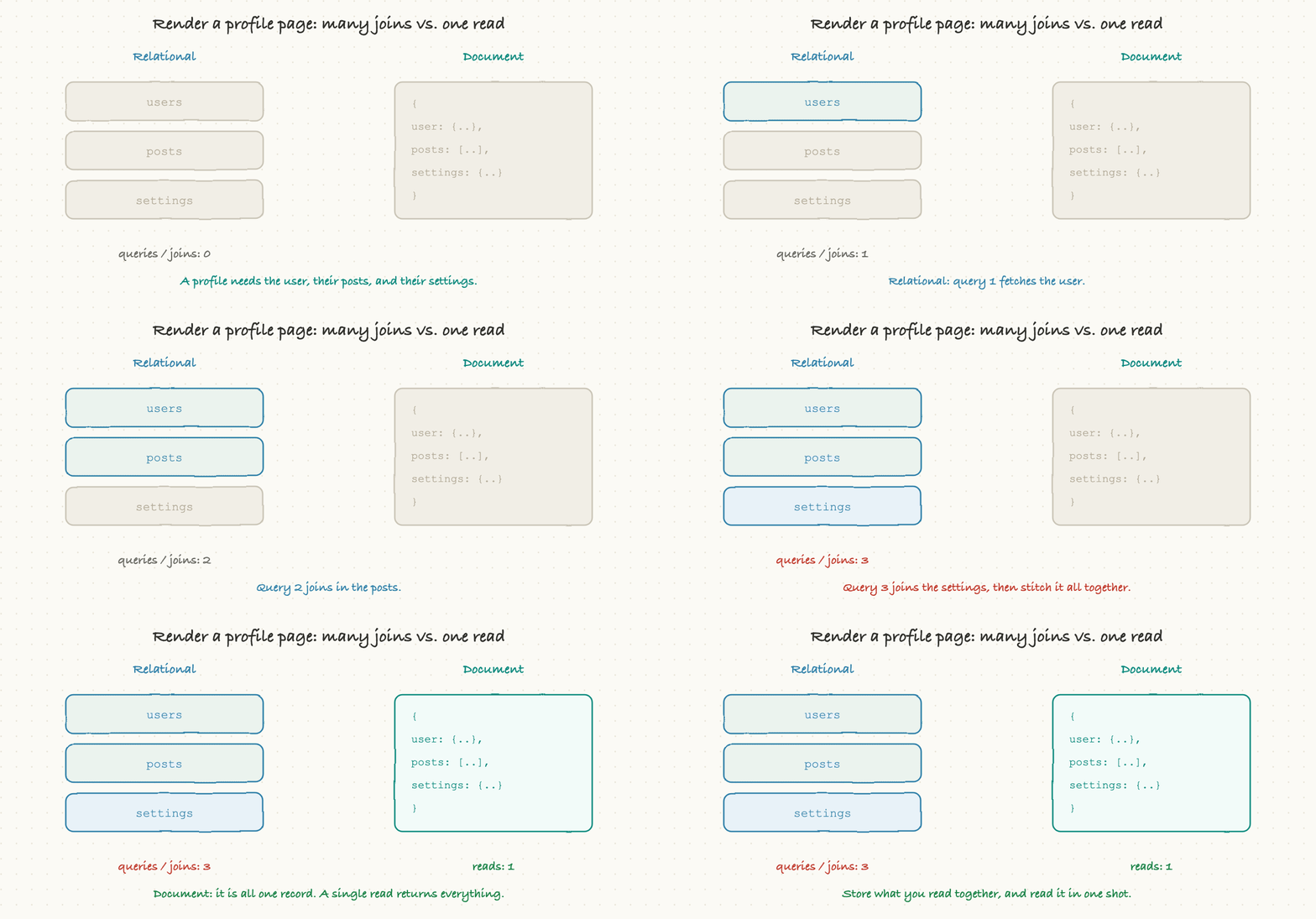
This is where the payoff becomes concrete. Picture rendering a profile page that needs the user, their recent posts, and their settings. In a relational database, that's three queries or a multi-table join, fetched separately and stitched back together in code. In a document database, if you've designed the profile as one aggregate document, it's a single read that returns everything at once.
That difference matters enormously at scale. Reading one document by its id is one of the fastest things a database can do, and it stays fast no matter how big the overall dataset grows, because the database goes straight to that one record. An application built around "one screen equals one document read" can serve enormous traffic with very predictable performance. This is precisely why document databases are so popular for the read-heavy, object-at-a-time workloads of modern web and mobile apps: product catalogs, user profiles, content feeds, shopping carts, and configuration.
Scaling: built to spread out
Document databases were born in the era when scaling across many machines stopped being optional, and it shows in their design. Because each document is self-contained, it can live on any machine without needing the others, which makes these databases natural at sharding, splitting the data across many servers.
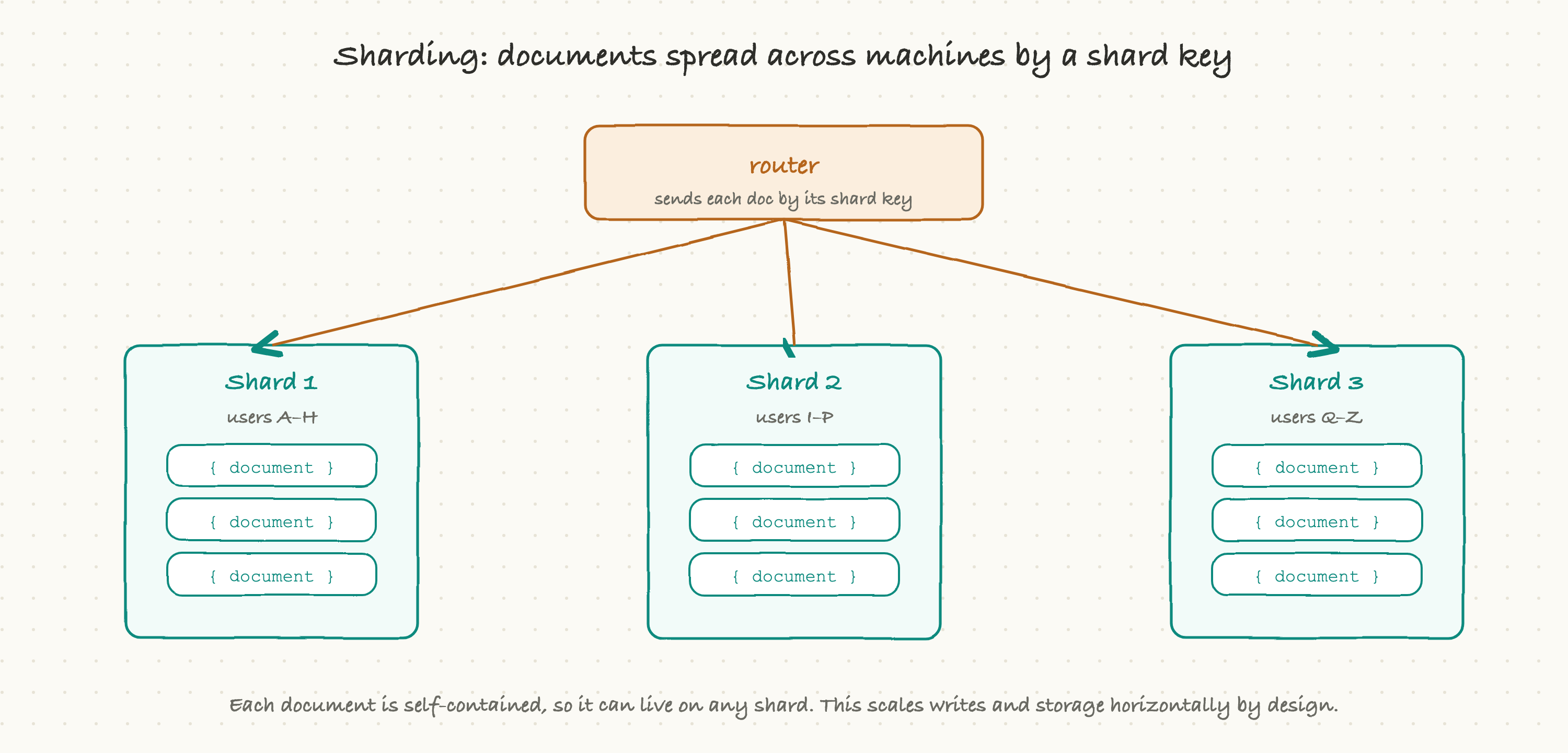
You choose a shard key (say, the user id), and the database routes each document to a shard based on that key. Reads and writes for a given document go straight to the shard that holds it. Add more shards and you add more capacity, for both storage and writes. This is the very thing relational databases struggle with, as we saw in the last article: their single-primary write model hits a ceiling, and sharding them breaks joins and transactions. Document databases sidestep much of that pain because their data is already in self-contained chunks that don't need to be joined across shards.
The catch is that the shard key choice is critical and hard to change later. Pick a key that spreads writes evenly and you scale smoothly; pick one that funnels most traffic to a single shard (a "hot shard") and you've recreated the single-machine bottleneck you were trying to escape. This is a genuine design decision with long-term consequences, the kind worth a careful conversation early.
The trade-offs, honestly
Document databases are not a free upgrade over relational ones; they make a different set of trades, and a clear-eyed view of the downsides is what separates a good technology choice from a fashionable one.
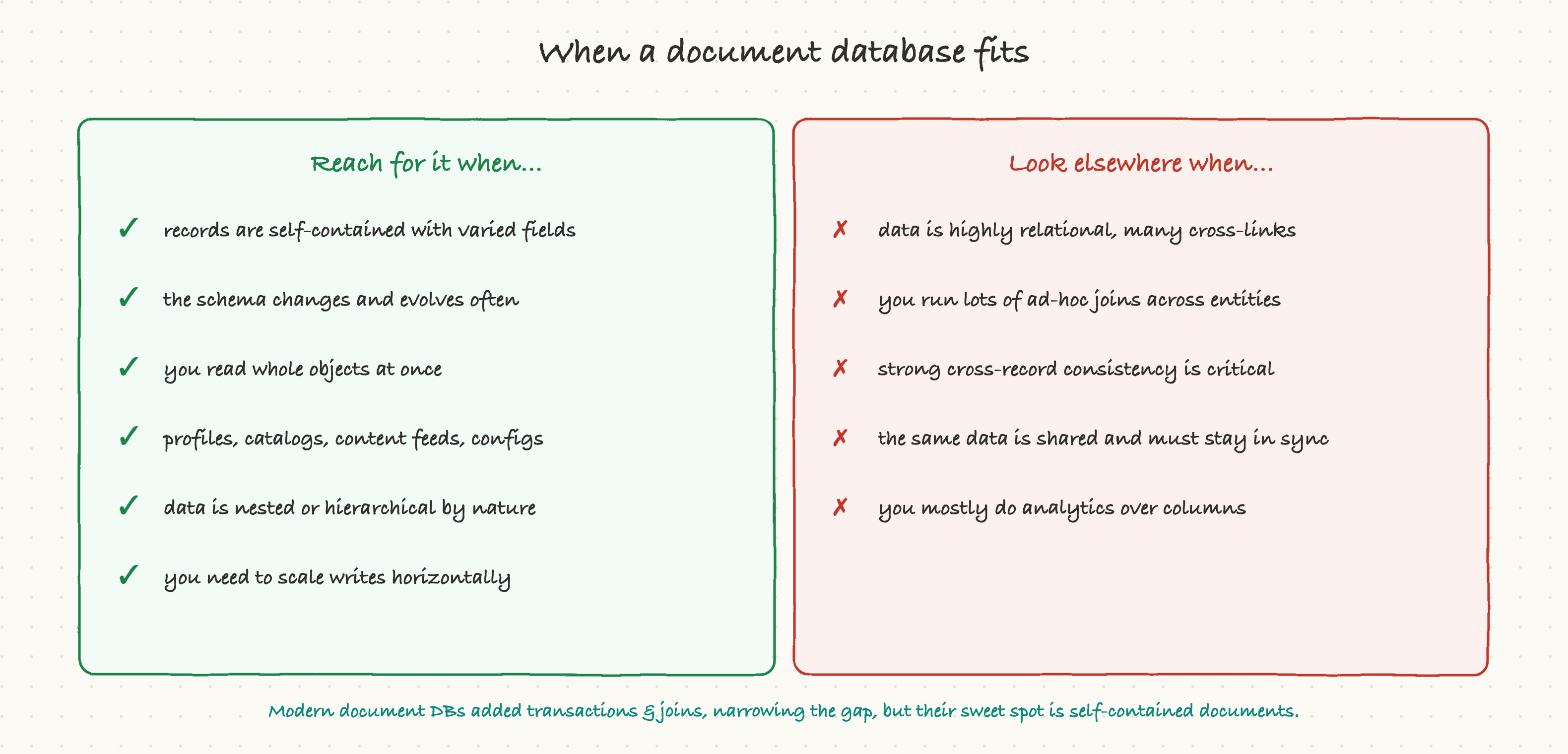
They shine when your records are self-contained with varied fields, when the schema evolves often, when you read whole objects at once, and when you need to scale writes horizontally: profiles, catalogs, feeds, carts, configs, and event data. They strain when your data is deeply relational with many cross-references, when you need lots of ad-hoc joins across different entities, when the same data is shared everywhere and must stay perfectly in sync, or when strong cross-record consistency is essential. The classic mistake is reaching for a document database because it's trendy, then discovering your data was relational all along and you're now doing joins by hand in application code, which is slower and more error-prone than letting a relational database do them.
It's worth noting the gap has narrowed. Modern document databases have added features they once lacked, multi-document transactions, the ability to do joins, richer querying and indexing, so the hard lines between the families are blurrier than they used to be. But the sweet spot hasn't moved: document databases are at their best when your data genuinely wants to be stored and read as whole, self-contained documents.
Why a TPM should care
You won't be choosing shard keys, but the document-versus-relational decision shapes a surprising amount of what your teams can do quickly and what will cost them later. A few things to keep in mind:
- Schema flexibility cuts both ways in your planning. When a team is on a document database, "add a new field" is often near-instant, which is great for fast-moving product work. But ask where the schema discipline now lives, because it has moved into the application code. "The database doesn't enforce it" can quietly become "different parts of our data are subtly inconsistent" if no one is minding it.
- "How is this modeled, embedded or referenced?" is a fair question. Performance problems and data-consistency bugs in document databases very often trace back to that one decision. You don't need to make the call, but knowing it's the key fork helps you understand why a seemingly simple change ("just update the product name everywhere") might be a big deal if the data was embedded.
- The shard key is a long-term commitment. If a team is scaling a document database across machines, the shard key choice is hard to undo and determines whether they scale smoothly or hit a hot-shard wall. It deserves real thought up front, not a default.
- Match the database to the data, not to fashion. The healthiest sign is a team that chose a document database because their data is genuinely object-shaped and self-contained, and a relational one because theirs is genuinely relational. Be gently skeptical of "we picked it because it's modern." The cost of the wrong fit shows up months later as hand-written joins and consistency bugs.
Document databases earned their place by matching the shape of a huge category of modern applications: load one object, show it, save it, scale it. When your data wants to be whole, they let it be whole, and that is a genuinely powerful thing. The next deep-dive looks at a very different NoSQL family, wide-column databases, built not for whole objects but for endless, relentless streams of writes.